
AutoInput v3.0.12
joaomgcd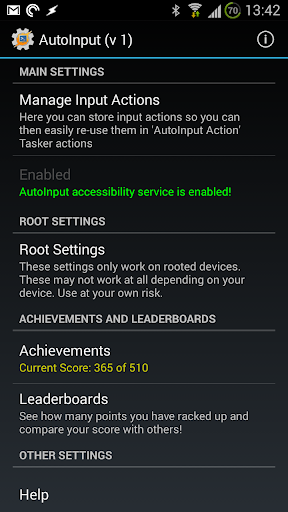


About this app
Developer Description
Automate any app's UI with AutoInput. Also react to UI events and physical keys
☑ Lifehacker: https://goo.gl/EJK7dC
☑ Android Police: https://goo.gl/ogRv2M
☑ Android Central: https://goo.gl/6zj9SC
Get started with AutoInput: http://joaoapps.com/autoinput/
☑ Face Unlock On Any Android 7+ Device
You can automatically dismiss your lock screen using just your face! Tasker NOT required! Full tutorial here: https://goo.gl/CipdM7
Tasker Features:
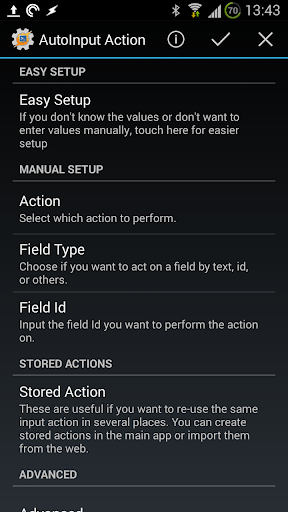
☑ No-Root UI Automation for Android 4.3+
With AutoInput's accessibility service you can simulate touches and other UI interaction, like writing text, in any app without rooting your device! Check out the demo video here: https://www.youtube.com/watch?v=U6ajlDn3cwY
For example:
→ changing any app's settings at will from Tasker!
→ replying to hangouts without needing to touch your phone!
→ toggling GPS on your phone without needing to be rooted!
☑ Get any On-Screen text into Tasker
Also using the accessibility service you can use any on-screen info in your Tasks! For example, recognize a song on Google Now and get its name in a Task as shown in this tutorial: https://goo.gl/cWtiqq
☑ React to On-Screen Events
You can setup profiles in Tasker to react to whatever's happening on your screen, like clicking on a button or an app changing its content
☑ Automate Any App
From now on, when you ask yourself "can I automate this app with Tasker?", the answer is "you probably can with AutoInput"! :)
☑ Free To Use
If you don't want to pay for the app you have the option to use it for free with rewarded ads!
******IMPORTANT NOTE*****
AutoInput is a Tasker plugin. You need to have Tasker (https://play.google.com/store/apps/details?id=net.dinglisch.android.taskerm) installed to use most of its features, so please be aware of that before using it.
You can get a free trial of Tasker here: https://tasker.joaoapps.com/download.html
**********************************
AutoInput has known limitations on Android 6 or below: you can't simulate clicks inside web views, which means you can't click links on web pages in most browsers and other Web based apps.
On Android 7 or above you can click everywhere!
This app uses Accessibility services.
What's New
In-app purchases
$1.99 per item
Version Information
- Version
- 3.0.12
- Downloads
- 500K+
- Updated on
- Nov 14, 2025
- Released
- Oct 14, 2014
- Requires
- Android 5.0
Statistics
Google Play Rating History
Rating Distribution
Downloads Over Time
AutoInput has been downloaded times. Over the past 30 days, it averaged downloads per day.
Shaded area shows 30-day prediction based on historical trends
Historical data collection started recently. More data points will be available over time.
AutoInput users say on Google Play
 Chris Lee
Another amazing plugin from the Android development powerhouse. The new version is even easier to use. Allows you to automate almost any phone function using a series of simulated key presses. This single plugin opens up so many new possibilities. This is the weapon of last resort, when all else fails if you can click it Tasker can now automate it.
 Wayne Lo
Keeping the accessibility function activated has been working better. Sometimes still has issues where access is revoked for no discernible reason.
 Haste Mampuai
It's a good apps. But for set text might have some bug which is it automatically separate the text with comma, even though I disable the separator or change the separator to other things beside comma. For example I have a variable 123,456 , it will only paste 123. Hope you guys can give me an useful solution. Thx
 King San Lee
upd: where is the beta? . conflicts with the bottom nav bar as others said, with android 15 or Samsung ui 7.... cannot work unless you repeatedly tap the nav buttons or disable accessibility in autoinput/force stop the app
 Clinton McCool
Major issues with Autoinput causing the navigation bar to be unresponsive in Android 15. Many users are reporting the same problem for the last 6 months. Navigation bar is unresponsive while accessibility service is enabled for Autoinput. The only work around is to set Autoinput to only turn accessibility service on and off just when needed, which greatly slows down routines. this issue has been reported for at least 6 months with no response or resolution. disappointed with the lack support.
ApkTrusted Ratings & Reviews
More from joaomgcd
See more apps
AutoShare Unlock Key
Paid

AutoRemoteLite
Free

AutoRemote
Paid

AutoLaunch Unlock Key
Paid

AutoShare
Free

AutoNotification
Free

AutoApp for Arduino
Free

AutoContacts
Free

AutoAlarm
Free

AutoApps
Free

AutoLaunch
Free

AutoLocation
Free

AutoCast
Free

AutoNotification Unlock Key
Free

AutoLocation Unlock Key
Free

AutoBluetooth
Free
Similar Apps

Automate
Free

Macrorify - Image Auto Clicker
Free

TAP Kiln Control Mobile
Free

Nothing Pomodoro Timer
Paid

Touch Screen Test
Free

MoeGo: Pet Business Suite
Free

Quikshort: Shortcut Creator
Free

Retro Mode - Icon Pack (Light)
Paid

ChargeNow
Free

Square Invoices Beta
Free

Cloaked: Protect your privacy
Free

Autio - Travel Companion
Free

Square Point of Sale Beta
Free

JobNimbus: All-In-One Roof App
Free

Progressive Pomo: Focus Timer
Paid

Componentry
Paid
Scan this QR code to download

Forwarding you to the page at Google Play market in seconds...
Open Google Play market now