
MBTA mTicket v7.9.0
MBTA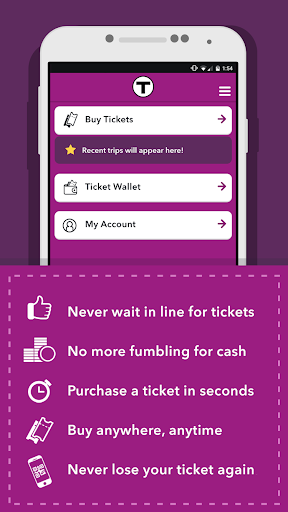
About this app
The MBTA mTicket app solves the problem of cumbersome ticket purchasing for public transportation in the Boston area, benefiting commuters and occasional riders alike by providing a quick and convenient way to buy tickets. Compared to other navigation apps, MBTA mTicket stands out for its specific focus on ticketing, making it a must-have for those who frequently use the MBTA system. However, its limited functionality and mixed user reviews hold it back from being a top-rated app in the Maps And Navigation category. With its straightforward design, the app is easy to use but may lack the polish and features of more comprehensive transit apps.
Pros
- The MBTA mTicket app has a significant advantage in terms of convenience, allowing users to purchase tickets anywhere, anytime, which is a major plus for commuters who value time efficiency.
- With over 500,000 downloads, the app has a moderate level of social proof, indicating that many users find it useful for their daily commutes.
- The app's developer, MBTA, is a reputable organization, which lends credibility to the app and ensures that it is regularly updated to meet the needs of its users.
- The absence of ads and in-app purchases enhances the user experience, making it more enjoyable and less distracting for those who just want to buy their tickets quickly.
- The app's simplicity and lack of permissions requests are notable, as they contribute to a seamless and private user experience, which is essential for a ticketing app.
Cons
- One of the primary concerns with the MBTA mTicket app is its mixed user rating, which suggests that some users encounter issues or have unmet expectations, potentially related to the app's functionality or user interface.
- The app's limited functionality, focused solely on ticket purchasing, might be a drawback for users who prefer more comprehensive transit apps that offer additional features like route planning or real-time schedules.
- Some users may find the app's design and user interface to be less polished compared to other modern apps, which could impact the overall user experience and satisfaction.
- The requirement of Android 7.0 or higher might exclude some older devices, limiting the app's accessibility to users with older hardware.
Best for: The ideal user for the MBTA mTicket app is a frequent or occasional commuter in the Boston area, likely between the ages of 18 and 60, with a moderate level of technical skill, who values convenience and efficiency in their daily commute and is looking for a straightforward, hassle-free way to purchase tickets for the MBTA system.
Developer Description
Buy a ticket anywhere, anytime - in seconds.
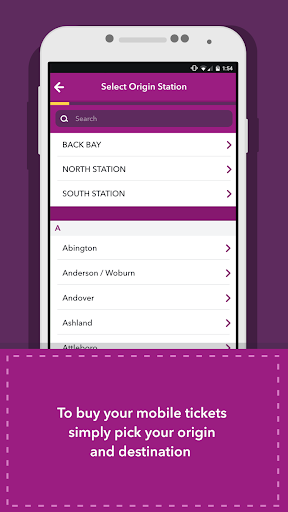
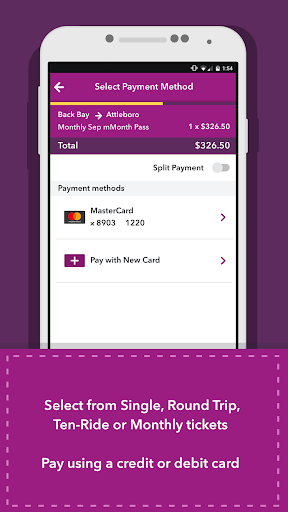
With the new MBTA mTicket App for Commuter Rail and Ferry, you can securely purchase MBTA Commuter Rail and Ferry Single Ride, Round-Trip, 10 Ride, and Monthly tickets in seconds. Purchasing a ticket is easy: select your trip & ticket type, enter your payment card information and your smartphone is your ticket!
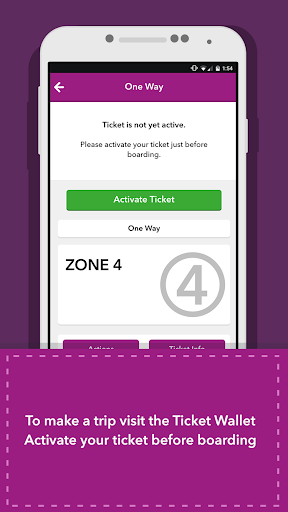
Never lose your ticket again! Once you purchase your ticket, it will always stick in My Tickets. Need to replace your phone? No problem -- we can easily transfer any purchased ticket.
Want to check your schedule or service updates? You can check schedules and T-Alerts right from inside the app!
We are making the app better everyday! Let us know what you think at www.mbta.com/mticket
Features:
● Secure ticket purchasing with your credit or debit card
● Your smartphone is your ticket
● Never worry about zones again -- just select your origin and destination to purchase
● Never lose your ticket -- tickets can be easily transferred if your phone is lost or stolen
● Check Commuter Rail schedules, maps, and service alerts
● Brand new offers from JustRide and the MBTA
Please note that support for Android beta versions or experimental features is not guaranteed and customers using Android beta versions or experimental features do so at their own risk.
Privacy
Given that the MBTA mTicket app requests no permissions, it poses minimal risk to user privacy, and the data collected is likely limited to transactional information necessary for ticket purchasing. However, users should still be cautious when entering payment information and ensure they are using a secure connection. Regularly reviewing the app's terms of service and privacy policy is also advisable.
Tips
To get the most out of the MBTA mTicket app, users should first ensure their device meets the minimum Android requirement and then familiarize themselves with the app's simple interface. For optimal performance, it's recommended to keep the app updated, as new versions may address any existing issues or improve the user experience. Additionally, users can explore the app's settings to customize their experience, such as setting up favorite routes or payment methods for quicker ticket purchasing.
What's New
Version Information
- Version
- 7.9.0
- Downloads
- 500K+
- Updated on
- Sep 11, 2025
- Released
- Nov 8, 2012
- Requires
- Android 7.0
Statistics
Google Play Rating History
Rating Distribution
Downloads Over Time
MBTA mTicket has been downloaded times. Over the past 30 days, it averaged downloads per day.
Shaded area shows 30-day prediction based on historical trends
Historical data collection started recently. More data points will be available over time.
MBTA mTicket users say on Google Play
 Derek DiMeglio
it works for me on my samsung. I think it's a g36
 Derek Monroe
App works fine overall, but after the latest update (April 2023), I can no longer exit the app without killing it - this seems to be a bug. The new UI also introduced a lot more "space" between everything which to me is a step backwards since I can't see as much as I used to be able to on a single screen. Samsung Galaxy S23+.
 Zachary Yaro
The app puts parts of its interface behind the status bar at the top and back/home/recent apps buttons at the bottom on my newer Pixel Fold with up-to-date Android 16. It makes it impossible to press certain buttons.
 George Borhegyi
Please fix the screen layout! Guys, The app is extremely hard to use, if not impossible, when you can't get to the top menus and you can't touch the bottom of the screen because the app draws under the navigation buttons on Android! I tried rotating, hoping it would move out of the way, but the app doesn't seem to accommodate rotation. Was this app tested at all?!? It seems there was no UI/UX testing. Perhaps written using AI coding and not checked? Please fix ASAP. Thanks! 🙏
 Chris McCabe
*Edit* - Seems there's a new 2024 feature wherein if you activate your flexpass, then close the app, then bring it back up, it does NOT default to your active ticket on the main screen. I assume they are now trying to trick people into activating an extra ticket on the return trip. The "Alerts" button should be on the app's homepage given that the trains are delayed all the time. Instead, you have to click on a tiny thing in the upper right hand corner and then select from a utilities list.
ApkTrusted Ratings & Reviews
More from MBTA
See more apps

Similar Apps

BBBUS COM
Free

Reliant
Free

Norwegian Cruise Line
Free

Oriental Bank
Free

Citi Mobile®
Free

NJ TRANSIT Mobile App
Free

HS Team
Free

Citizens Bank Mobile Banking
Free

Ambassador Cruise Line
Free

CLEAR - Travel & Experiences
Free

Square Invoices Beta
Free

Ventra
Free

Cooper's Hawk
Free

GEICO Mobile - Car Insurance
Free

Uber Pro Card
Free

My CenturyLink
Free
Scan this QR code to download

Forwarding you to the page at Google Play market in seconds...
Open Google Play market now