
S-pushTAN - sichere Freigaben vVARY
Star Finanz GmbH




About this app
Developer Description
S-pushTAN can do more: Mobile banking + authorization of internet card payments
IT'S EASY
• When banking online on your smartphone, tablet, or computer, you place and submit your orders there.
• The S-pushTAN app always shows you the order details. You check the data and approve the order easily and simply – that's it.
• Can be used for all orders that require a TAN or authorization: transfers, submitting or changing standing orders, securities and service orders, and much more.
GET STARTED AFTER ACTIVATION BY YOUR SAVINGS BANK
You can start using the S-pushTAN app once you are registered for the pushTAN process and have received your personal registration letter:
1 - Apply for the pushTAN process at your savings bank or switch from your current process to the pushTAN process online at your savings bank's online branch.
2 - Download the S-pushTAN app for free to your smartphone or tablet.
3 - Start setting up the S-pushTAN app as soon as you receive the registration letter from your savings bank.
SECURITY
• The S-pushTAN app communicates encrypted via tested interfaces. It ensures secure data transfer in accordance with German online banking regulations.
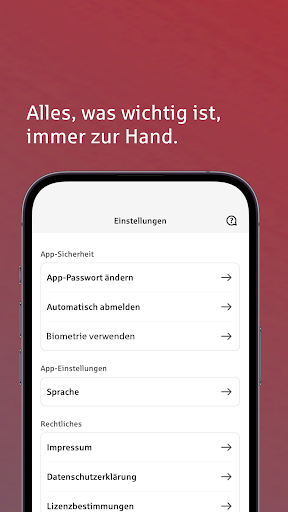
• Access to S-pushTAN is protected by a password of your choice and, optionally, by fingerprint or facial recognition.
• The app automatically locks after a short period of time. This ensures maximum security for your data, even if you lose your smartphone or tablet.
NOTES
• To use S-pushTAN, you need activation from your Sparkasse and your registration data for initial setup.
• To use the latest version of the app, you need at least Android 6 on your smartphone or tablet.
• If your smartphone or tablet is rooted or is using a beta version of the operating system, S-pushTAN will not run on it. The important high security standards for the mobile banking we offer cannot be guaranteed on compromised devices.
• The current version requires the use of your device's system keyboard; custom keyboards are not supported. In the device settings, set the keyboard to "Standard" or "Default" or "System Keyboard."
• Please do not deny any of the requested permissions for S-pushTAN during setup, as these are necessary for the app to function properly.
• The app is free of charge, but its use may incur charges. Please refer to the information provided by your savings bank.
------------------------------------------------------------------------
We take the protection of your data very seriously. It is regulated in our privacy policy. By downloading and/or using the S-pushTAN app, you unconditionally accept the terms of the Star Finanz GmbH End User License Agreement.
• Data protection: https://cdn.starfinanz.de/s-pushtan-datenschutz
• Terms of use: https://cdn.starfinanz.de/s-pushtan-lizenzbestimmung
• Accessibility statement: https://www.sparkasse.de/pk/produkte/konten-und-karten/finanzen-apps/s-pushtan.html
What's New
Ab sofort können Sie bei Einrichtung eines Erstzugangs in Ihrer S-pushTAN-App die praktische Expresseinrichtung nutzen. Damit wird Ihr Zugang ganz bequem in die App Sparkasse und/oder Sparkasse Business übernommen – ohne dass Sie diesen manuell einrichten müssen.
+ Verbesserungen +
Zudem finden Sie wieder kleinere Anpassungen für eine optimierte Nutzung und für noch mehr Sicherheit und Komfort im Banking.
Version Information
- Version
- -
- Downloads
- 10M+
- Updated on
- Nov 19, 2025
- Released
- Apr 10, 2014
- Requires
- Android Varies with device
Statistics
Google Play Rating History
Rating Distribution
Downloads Over Time
S-pushTAN - sichere Freigaben has been downloaded times. Over the past 30 days, it averaged downloads per day.
Shaded area shows 30-day prediction based on historical trends
Historical data collection started recently. More data points will be available over time.
S-pushTAN - sichere Freigaben - Google Play Rankings
Top Rankings
| Rank | Country | Category | List | Change |
|---|---|---|---|---|
| — |
Ranking History in
No ranking data available yet. Rankings are updated daily.
#1 in Top Free Finance in Germany


#17 in Top Free Apps in Germany


S-pushTAN - sichere Freigaben users say on Google Play
 N AZ
N AZ
it shows black screen on android 16, fix please. update: thank you for the fast response, your suggestioned quick fix worked perfectly. thank you!!
 Ibrahim Senan
The app works perfectly, but I am unable to add new devices. It is stuck on screen Searching for Device
 Drosis
Es muss als ein App im Zukunft sein, es ist kein 2010 mehr.
 Ausaf Zakaria
Same issue as mentioned by other people, the app is not working and not opening, just showing white background. Even after reinstalling, the same issue persists. The usefulness of the banking apps is to be able to operate anytime... If when it's required it doesn't work... the whole process is futile. please look into it. Many people are facing the same issue. Highly problematic. On top of that there is no real time solution from Customer care. Disappointed.
ApkTrusted Ratings & Reviews
More from Star Finanz GmbH
See more apps




Similar Apps










Scan this QR code to download

Forwarding you to the page at Google Play market in seconds...
Open Google Play market now