
Telemeter - camera measure vVARY
vistech.projects


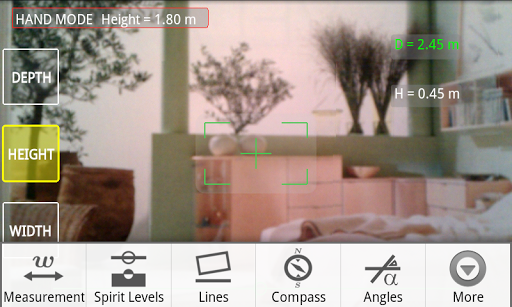
About this app
Developer Description
Camera measure tool with 5 modes for planning your room garden outdoor activity.
Modes:
- Telemeter Tool: quick remote distance estimation without reference objects using only a camera measure.
- SpiritLevel3D Tool: distant object alignment and tilt measurement using a camera.
- Lines Tool: vertical and horizontal reference lines, that can be used for horizontal or vertical object alignment and tilt elimination.
- Augmented Compass Tool: orientation detection in the room or space for better room planning, angle measurements, electromagnetic interference and metal detection.
- Angle Tool: measure and mark angles in vertical and horizontal planes.
- Calibration Tool: calibrate your phone before measurements.
- Unit Converter: convert results into different length or area units.
- Detailed help
The distinctive feature of the Telemeter Tool is two options:
- Hand-mode
- Stand-mode
Choose Hand-Mode when the exact height of the camera is unknown and you are on the ground holding the device in you hands.
Enter your height and smart algorithm estimates the camera height. You don't need to enter the exact camera height, as required in other applications. Since you know your height exactly, you can start measurements immediately. This is an advantage of using Hand-mode. This mode requires to hold and move your camera as shown in measurement guide that is included in the app.
If the exact height of the camera from the ground is known, Stand-Mode is to be used.
Stand-mode doesn't make any assumption about your position. Exact camera height leads to more accurate measurement results. You can use this mode in different situations or build your own camera measurement setup.
Measurements can be conducted in metric and imperial units: feet, meters, inches. Angles are measured in degrees.
With the Telemeter you can measure:
- distance from you (observer) to an object
- distance between points in direction 'from an observer'
- distance between two points in a plane
- object dimensions (depth, height, width, length)
- height from the ground level
- height of big objects or a person
- angles between planes (e.g. between two walls)
- angles between two orientations in the space
- angles in horizontal or vertical planes
You can also use Telemeter for:
- object alignment
- tilt measurement or elimination, pitch gauge
- checking orientation in space (cardinal directions)
- electromagnetic interference and metal detection
- marking a plane for object placement (e.g. a wall for pictures and shelves mounting)
Please try also Partometer - camera measure App, that uses common reference objects for measurements.
For long distance you can try Distance2Meter - camera measure that uses motion for distance measurement. You can measure distances in hundred meters range with good accuracy.
If you enjoy using this app, please take a moment to share your experience and rate it.
Thank you for your support!
G+: +VisTech.Projects
FB: vistech.projects
TW: @VTProjects
Version Information
- Version
- -
- Downloads
- 5K+
- Updated on
- -
- Released
- Aug 16, 2011
- Requires
- Android Varies with device
Statistics
Google Play Rating History
Rating Distribution
Downloads Over Time
Telemeter - camera measure has been downloaded times. Over the past 30 days, it averaged downloads per day.
Shaded area shows 30-day prediction based on historical trends
Historical data collection started recently. More data points will be available over time.
Telemeter - camera measure users say on Google Play
 A Google user
Takes some time to get used to
A Google user
Thankfully I had the youtube video on this app pulled up so I can figure out how to use it. Without the video I would had thought the app was broken
A Google user
Freezes phone on galaxy s 3
ApkTrusted Ratings & Reviews
More from vistech.projects
See more apps
Pie+ camera measure
Free

Laser Distance Meter cam tool
Paid

Millimeter Pro - screen ruler
Paid
ColorMeter camera color picker
Paid

Millimeter - screen ruler app
Free
ColorMeter - color picker RGB
Free
My Face Shape Meter and frames
Paid

Planimeter - GPS area measure
Free
Planimeter Area Measure Guide
Free
Partometer3D - camera measure
Paid

Partometer - camera measure
Free
Diskometer - camera measure
Paid

Unit Converter 4U quick tool
Free

Planimeter GPS area measure
Free
Pupillary Distance Meter | PD
Free
Pupil Distance Meter | Custom
Free
Similar Apps

QR & Barcode Scanner
Paid

DreamBuild: Sketch to 3D
Paid
Ruler
Free
CompanyCam
Free
Sun Seeker: Sunlight Tracker
Paid

Leafplant: AI Plant Identifier
Paid

4ART
Free

DeRadar
Paid

House Design : AI Home Design
Paid
My Emotional Compass
Paid

Qibla Direction- GPS Compass
Paid

Via Capitale Camera
Free
Compass Steel
Free

Compass & Altimeter
Free

YourSweep
Free

Polycam: 3D Scanner & Editor
Free
Scan this QR code to download

Forwarding you to the page at Google Play market in seconds...
Open Google Play market now