Zen Brush 3 v1.18
PSOFT MOBILE





About this app
Developer Description
Freely draw beautiful zen art.
The drawing system that brings to life a feeling of silky fluent and delicate painting now allows an even wider range of expression thanks to the addition of "water" and "color". Providing a new simple and intuitive user interface, this app is designed to be optimal for performing Zen art.
Simply start the app and you are immediately ready to draw. Anyone, anywhere, can create superb Zen art with this app’s uniquely rich expressiveness. You can also easily share and edit your calligraphy and images with other apps using the Export functionality. Skillfully use the rich background style templates to create and share atmospheric artwork.
- The drawing system simulates a 3D model of an East Asian ink brush to enable varied and natural styles of brush handling.
- The adjustable amount of water makes it possible to create expressions ranging from powerful edge effects to "nijimi" (bleeding) and "bokashi" (blurring) where colors mix.
- You can also enjoy creating colored-ink paintings as well as watercolor paintings by making use of 30 selected traditional Japanese colors.
- The layer functionality allows more flexible editing.
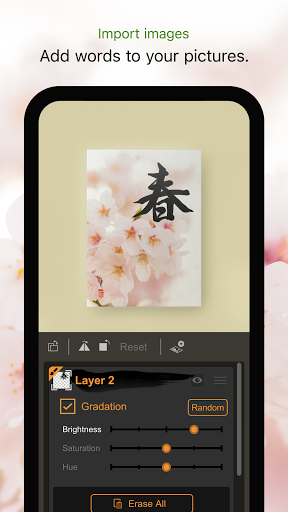
- Import photos to add text to them or use them as background images for tracing.
- Create fascinating artwork with a rich assortment of background style templates.
- Traditional Japanese paper templates provide an authentic feel.
Features:
- 5 main tools (ink brush, color brush, water brush, eraser, blotting paper).
- 10 levels of thickness.
- 5 levels of water (not applicable to blotting paper).
- 10 levels of ink tone (not applicable to water brush and blotting paper).
- Color palette with 30 colors.
- 89 background style templates.
- Drying functionality (fast dry, instant dry, adjustable natural dry).
- Layers functionality (import image / color adjustment / move / rotate / scale / reverse left and right / white transparency / gradation effect).
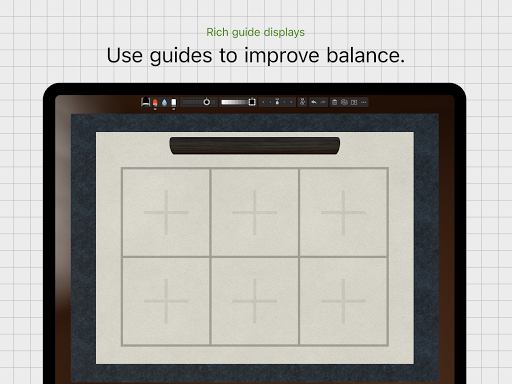
- Guide display (character guides / partition guides / grid guides).
- Movable toolbar (top / bottom / left / right).
- Canvas zoom (zoom in and out with pinch gestures).
- Undo / redo (5 levels).
- Export functionality (formats: JPEG, PNG, transparent PNG (no background)).
- Android stylus support (pressure: only if supported by Android OS).
- Drawing tool selection (finger and stylus / stylus only).
- Adjustable brush pressure sensitivity (5 levels, with supported stylus only).
- Adjustable tilt sensitivity (5 levels, with supported stylus only).
- Gesture functionality (pinch zoom and drag, zoom toggle with 2-finger tap).
- 3D brush display (enable / disable).
- Pointer display (enable / disable).
- 5 levels of canvas resolution with a maximum of 3072 x 4096 pixels (the higher resolutions do not work on devices with lower specs).
What's New
- Improved operation when reordering layers.
- Minor bug fixes.
Version Information
- Version
- 1.18
- Downloads
- 1K+
- Updated on
- Oct 27, 2025
- Released
- Oct 9, 2020
- Requires
- Android 9
Statistics
Google Play Rating History
Rating Distribution
Downloads Over Time
Zen Brush 3 has been downloaded times. Over the past 30 days, it averaged downloads per day.
Shaded area shows 30-day prediction based on historical trends
Historical data collection started recently. More data points will be available over time.
Zen Brush 3 - Google Play Rankings
Top Rankings
| Rank | Country | Category | List | Change |
|---|---|---|---|---|
| — |
Ranking History in
No ranking data available yet. Rankings are updated daily.
#38 in Top Paid Art And Design in Pakistan

#38 in Top Paid Art And Design in Thailand
#38 in Top Paid Art And Design in Mexico
#39 in Top Paid Art And Design in Saudi Arabia
Zen Brush 3 users say on Google Play
 Rainy Sand
Wonderful. This app is so realistic and so much fun! Worth every penny. The interface is intuitive and easy to use. I have used genuine Chinese and Japanese paper, brushes and ink in the past. This app feels like the real thing. Truly a great app to practise and create Japanese and Chinese style art. You will also save a fortune on paper and ink supplies! Plus, no mess to cleanup! Very pleased!
 Marcio Wanick
Hi, developer! Congratulations! I've been using the app on a Samsung S6 lite tablet. The ink experience is nice at lower resolutions. The water simulation and eraser are really impressive. But the strokes feel a little bit heavier at higher resolutions. There is also an issue with pen tilting recognition. Other apps like Infinite Painter, or super display recognize it very well. So I think it is an isolated issue within this app. Could you please help me? Thank you very much!
 Mike Alexander
It's an okay time wasting art app, but reminds me of a 'wannabe' beginning copycat coding experience. A glorified version of Microsoft Paint? It is really super annoying how the stylus input 'lags' as bad as it does with this app! It is horribly 'retarded' as what you draw on the display LAGS behind your stylus. It is the fault of the app because several other art apps don't do this (e.g., Procreate, Infinite Painter, Adobe EVERYTHING...); it's not my hardware > SSG Tab 7+
 mediabrolly .com
Slow, and now additive brush strokes have gone (gets darker the more you paint over it) so it feels just like a sluggish standard generic paint app zenbrush 2 was one the best paint/sketch apps available this version is not. Such a shame
ApkTrusted Ratings & Reviews
More from PSOFT MOBILE
See more apps
Similar Apps

ArtFlow: Paint Draw Sketchbook
Free

AR Drawing - Paint and Sketch
Free

HiPaint: Sketch & Draw art
Free
Bamboo Paper
Free

MediBang Paint:Draw Art, Comic
Free

DreamBuild: Sketch to 3D
Paid
Notes, Journal, Diary: PenCake
Free

Huion Note : Easy note-taking
Free

touchnotes
Free

Noteshelf - Notes, Annotations
Paid

Invitation Maker & Card Design
Free

Sketch Pro: Draw & Create Art
Free
Easy Draw Animals
Free
Rudolph: Coloring book
Free

Logo Maker Design AI Generator
Free

Geulgram - Text on Photo
Free
Scan this QR code to download

Forwarding you to the page at Google Play market in seconds...
Open Google Play market now