
Stanford Health Care MyHealth v11.5
Stanford Health Care




About this app
Developer Description
Manage your health care with Stanford Health Care's MyHealth mobile Android app.
With the Stanford Health Care MyHealth app you can:
1. Schedule your in-person appointments or video visits, and eCheck-in for appointments
2. Communicate with your care team
3. View test results and manage medications
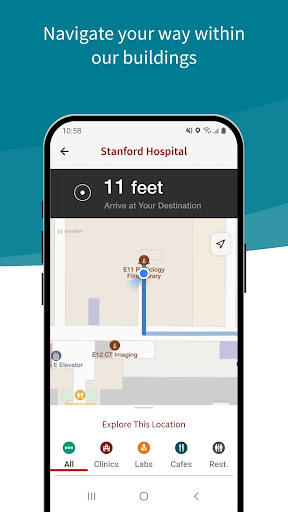
4. Inside our buildings, follow step by step directions to your appointment location
5. Review and pay bills
6. Get up to date health information during a stay at the hospital
and more…
What's New
Version Information
- Version
- 11.5
- Downloads
- 100K+
- Updated on
- Dec 1, 2025
- Released
- Dec 17, 2015
- Requires
- Android 10
Statistics
Google Play Rating History
Rating Distribution
Downloads Over Time
Stanford Health Care MyHealth has been downloaded times. Over the past 30 days, it averaged downloads per day.
Shaded area shows 30-day prediction based on historical trends
Historical data collection started recently. More data points will be available over time.
Stanford Health Care MyHealth users say on Google Play
 Gail Gross
easy directions. especially for older people. It helps us navigate through our medical information and so much easier to get to someone that can actually help.
 Alexander Kanarsky
Edit: app developer replied to my comment and pointed to option in the menu where I can enable screenshots. So I changing my rate to 4 stars. Original review: I can not make screenshots of my own test results, nor download the results- what's the point? I logged in, and it's my own results, why I cannot save the results? I can take photos using other phone or a camera anyways, so why make my life inconvenient?
 Satish Krishnamurthy
The app works as expected. I have a niggling little problem that I find quite irritating though. When I look through my appointments, there's an option to add the appointment to my calendar. If you choose that, then you're given a choice: "Add details" or "Add the date and time only". Both options do exactly the same thing - they only add the date and time and nothing else. If I choose to add details, then I'd expect the location to be added and the other details as well, but it doesn't happen.
 N Mar
N Mar
Play "Store" installation is wonky. App function basic utilitarian for sending simple messages and appt checkin. Otherwise best to work directly with human assistance.
 M B
M B
need to show input so it can be verified
ApkTrusted Ratings & Reviews
Similar Apps

AdventHealth
Free

Nemours Children’s MyChart
Free

Kaia Health
Free

healow
Free

Aetna Health
Free

Wellframe
Free

My Doctor Online (NCAL Only)
Free

My CenturyLink
Free

athenaPatient
Free

SimplePractice Client Portal
Free

MyBSWHealth
Free

MOBE Health Guide
Free

Wondr Health
Free

Marathon Health
Free

Visible: Pacing for illness
Free

Sydney Health
Free
Scan this QR code to download

Forwarding you to the page at Google Play market in seconds...
Open Google Play market now