Octave v25.04.18
UserLAnd Technologies






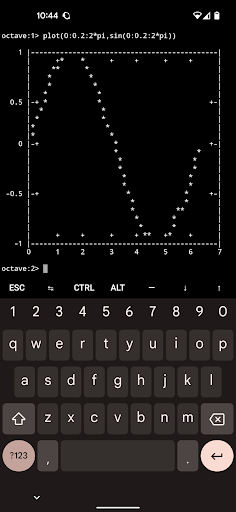
About this app
Developer Description
Turn your device into the most powerful graphing calculator around!
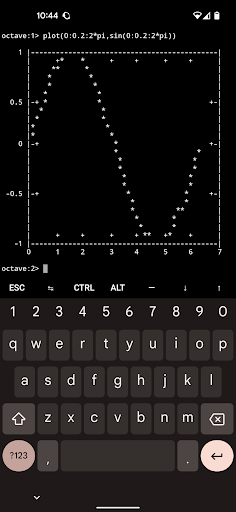
This lets you run Octave / Matlab code on your phone (not the cloud) and without restrictions.
About Octave:
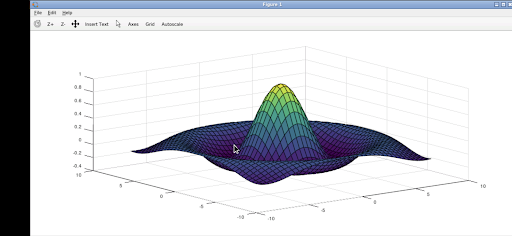
GNU Octave supports a powerful mathematics-oriented syntax with built-in 2D/3D plotting and visualization tools. It features a high-level programming language, primarily intended for numerical computations. Octave helps in solving linear and nonlinear problems numerically, and for performing other numerical experiments using a language that is mostly compatible with MATLAB. It may also be used as a batch-oriented language. It has too many features to list here, but you can check out the project page for more information: https://www.gnu.org/software/octave/
How to use this Octave Android app:
If using the terminal, you just start typing commands as you see fit.
If using the graphical interface, use it just like normal. But here are some specifics to the Android interface.
* Tap with one figure to left click.
* Move mouse by sliding around one finger.
* Pinch to zoom.
* Press and hold and then slide one finger to pan (useful when zoomed in).
* Slide two fingers up and down to scroll.
* If you want to bring up a keyboard, tap on the screen to get a set of icons to appear and then click the keyboard icon.
* If you want to do the equivalent to a right click, tap with two fingers.
* If you want to change the desktop scaling, find the service android notification and click the settings. You have to stop and restart the app after changing this settings for it to take effect.
This is all easier to do on a tablet and with a stylus, but it can be done on a phone or using your finger as well.
To access files from the rest of Android, there are many useful links in your home directory (/home/userland) to places like your Documents, Pictures, etc. No need to import or export files.
If you don't want to, or cannot pay the cost of this app, you can run Octave via the UserLAnd app.
Licensing:
This app is released under the GPLv3. The source code can be found here:
https://github.com/CypherpunkArmory/octave
This app is not created by the main GNU Octave development team. Instead it is an adaptation that allows the Linux version to run on Android.
What's New
Those files can be accessed from the Octave file browser at /sdcard/
For example, /sdcard/Documents will be your Android Documents directory
Version Information
- Version
- 25.04.18
- Downloads
- 1K+
- Updated on
- Apr 18, 2025
- Released
- Apr 29, 2022
- Requires
- Android 5.0
Statistics
Google Play Rating History
Rating Distribution
Downloads Over Time
Octave has been downloaded times. Over the past 30 days, it averaged downloads per day.
Shaded area shows 30-day prediction based on historical trends
Historical data collection started recently. More data points will be available over time.
Octave users say on Google Play
 Ant
Ant
I haven't used the terminal much so this review is mainly concerning the GUI. This is basically the same as the PC software. Quite tricky to use with a touchscreen but works well overall. I'm now using a bluetooth keyboard/trackpad which is a huge improvement. It's nice to have these capabilities on-the-go and means I wont need to carry my laptop as often. It works suprisingly fast as well, possibly even faster than my laptop which I don't understand. Well worth the money IMO.
 Wilson
Works Great. Works better than the Regular Userland Framework. Hasn't crashed yet.. Easy to use. Beautiful look and feel to it. Tip: Change input mode to "Direct, Swipe Pan", the first choice on top.
 Gallifrey falls No moore
Graphical mode hides App settings and app won't close, Terminal mode doesn't draw plots as jpg/png file. Can't use Android clipboard, can't tap/click to move editor cursor, can't use Android file manager (external storage). Won't load files saved by other text-editors (Access all files). Selecting keyboard/virtual arrows de-activates edit/input mode!!
 Mark Henderson
Very cumbersome interface. Installation problems.
 Rk J
Rk J
Won't share files or clipboard. Useless! The developer claims to have fixed this...we will see...
ApkTrusted Ratings & Reviews
More from UserLAnd Technologies
See more apps
BirdBox
Paid

UserLAnd - Linux on Android
Free
OG Munchers - Munch Numbers
Paid
FoxBox
Paid

OG Carmen - Stop VILE Agents
Paid

OG Arcade - 150+ Retro Games
Paid

IDLE - Develop with Python
Paid
deVStudio
Paid
CraftBox
Free
LibreDocs
Paid

Inky - Run Inkscape on Android
Paid
GIMP
Paid
gnuplot
Paid

OG Quest
Paid

OG Fighter
Paid
Andacious
Paid
Similar Apps

Lib of Dev (Open Source)
Free

AWS Console
Free

Pinwheel Caregiver
Free

Cyberpunk Red Companion
Free

CircuitMess Playground
Free

RAYNET CRM
Free
Code Studio
Free

Go.Learn
Free

Kajabi
Free

Mindbook Pro
Paid

Pocket Prep Professional 2026
Free

Thinkific
Free

Sens.ai Brain Training
Free
Learn R Programming
Free
Learn C++
Free
Cosmostation Interchain Wallet
Free
Scan this QR code to download

Forwarding you to the page at Google Play market in seconds...
Open Google Play market now