DroidCam Webcam & OBS Camera vVARY
Dev47Apps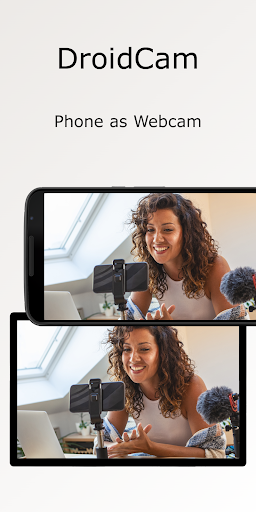



About this app
DroidCam Webcam & OBS Camera solves the problem of needing a dedicated webcam for computer use by repurposing the user's phone camera, benefiting those who frequently participate in video conferencing or streaming without access to a high-quality webcam. Compared to alternatives in the Tools category, DroidCam stands out for its ease of use and the ability to connect via WiFi or USB, making it a versatile option. However, its rating and download numbers suggest it falls short in terms of overall user satisfaction compared to some competitors. The app's simplicity and lack of extensive feature sets might also be a drawback for some users.
Pros
- With over 1,000,000 downloads and a 3.8/5 rating, DroidCam demonstrates a level of social proof and user acceptance that is beneficial for those looking for a reliable webcam solution.
- The app's ability to connect via both WiFi and USB provides flexibility and reliability, catering to different user preferences and network conditions.
- DroidCam's developer, Dev47Apps, offers support through a dedicated website and email, indicating a commitment to user assistance and feedback incorporation.
- The variety of in-app purchases, ranging from $4.99 to $14.99, suggests that users can customize their experience based on specific needs without committing to an overly expensive initial purchase.
- The absence of any permission requests is a significant advantage, as it alleviates concerns about data privacy and security, making it a more trustworthy option for users.
Cons
- Despite its benefits, the presence of ads might detract from the user experience, especially in professional or focused work environments where distractions need to be minimized.
- Some users might find the in-app purchase model confusing or overly expensive, particularly if they are unsure about which features they need or if the free version is sufficiently functional for their use case.
- The variability in Android requirements and size with different devices could lead to inconsistencies in performance or compatibility issues, which might frustrate users expecting a uniform experience across devices.
- The lack of detailed information about what each in-app purchase entails could lead to hesitation or dissatisfaction among potential buyers, as they might not fully understand what they are paying for.
Best for: The ideal user for DroidCam Webcam & OBS Camera is likely an individual who frequently engages in video conferencing, streaming, or other activities requiring a webcam, such as remote workers, gamers, or social media influencers, who value convenience, flexibility, and decent video quality without the need for an additional dedicated webcam device.
Developer Description
Use your phone as a webcam on your computer via WiFi or USB.
- Chat using "DroidCam Webcam" on your computer, including Sound and Picture.
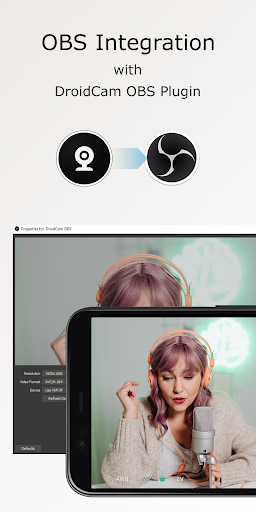
- Direct OBS Studio integration via DroidCam OBS plugin (see below).
- Free unlimited usage at standard definition (640x480).
- Up to 1080p Full-HD as a PC Webcam, and up to 4K UHD as an OBS Camera (see below).
- Both WiFi and USB connections supported*.
- HW assisted coding (if possible) and multiple video format options.
- DSLR -like features including exposure, white balance, and focus controls.
- Works with the phone screen off and in the background for extra efficiency.
PC WEBCAM – droidcam.app
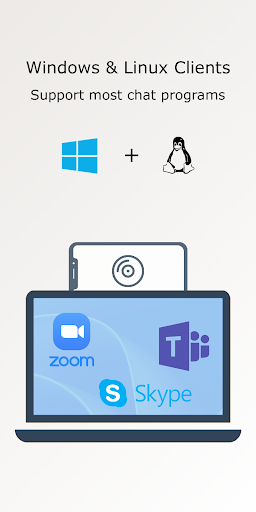
Get the DroidCam PC Client to use your phone as a webcam. The client is available for Windows & Linux systems, and works with Zoom, Skype, Discord, and most other programs.
👉 Go to https://droidcam.app/ on your computer to download and install the DroidCam Client, and to learn more about usage.
OBS CAMERA – droidcam.app/obs
Use DroidCam DIRECTLY in OBS Studio by getting the DroidCam OBS plugin, no need for a separate client. The DroidCam OBS plugin is available for Windows, Mac, and Linux (Flatpak) systems, and seamlessly integrates your phone to your setup.
👉 Go to droidcam.app/obs on your computer to download, install, and learn more about usage.
Bonus: You can use the 'OBS Virtual Camera' for Zoom/Skype/Discord integration, still no need for extra client software!
Simple & Efficient
DroidCam is designed with simplicity and efficiency in mind. What you see is what you get. The app is free to use at standard definition with no time limits. You can try HD video, but will need to purchase the pro upgrade to remove watermarks.
Pro Upgrade
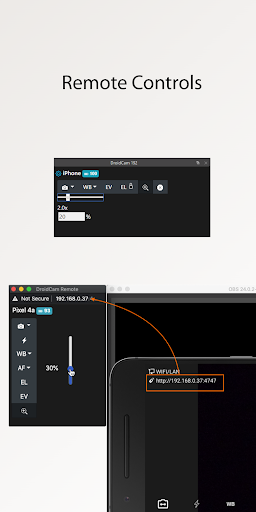
The pro upgrade includes more than just HD video. Unlock all options, manual camera controls and PC remote controls, remove advertising, and get the most from your phone camera. Check the in-app Upgrade and Settings pages for more.
A Bargain!
With optimized power usage and low-latency video transfer, DroidCam can replace webcams and capture cards saving you $100s. Use it for remote work, remote learning, teaching, and content creation.
ℹ️ Note: If you are having trouble with the pro license, make sure the app is installed with the correct Play Store profile and your device can access https://www.dev47apps.com.
*USB connection may require additional setup. Consult droidcam.app/help for usb setup information.
Privacy
Given that DroidCam requests no permissions, it poses a very low risk to user data and privacy, making it a secure choice for those concerned about app permissions. However, users should still be cautious about the data transmitted over WiFi or USB, ensuring they are using secure connections. It's also advisable to review the terms of service and privacy policy on the developer's website for any data collection practices related to in-app purchases or ads.
Tips
For optimal performance, ensure your phone and computer are connected to the same WiFi network or use a reliable USB connection. It's also beneficial to close other resource-intensive apps while using DroidCam to minimize lag and ensure a smooth video feed. Additionally, exploring the app's settings and available in-app purchases can help users customize their experience and potentially improve video quality or add needed features.
What's New
Fix remote control buttons not appearing correctly.
Tweaked permissions handling, Notifications are no longer forced (the app will lose background functionality when missing).
Some (potential) stability tweaks.
In-app purchases
$4.99 - $14.99 per item
Version Information
- Version
- -
- Downloads
- 1M+
- Updated on
- Sep 7, 2025
- Released
- Nov 15, 2020
- Requires
- Android Varies with device
Statistics
Google Play Rating History
Rating Distribution
Downloads Over Time
DroidCam Webcam & OBS Camera has been downloaded times. Over the past 30 days, it averaged downloads per day.
Shaded area shows 30-day prediction based on historical trends
Historical data collection started recently. More data points will be available over time.
DroidCam Webcam & OBS Camera - Google Play Rankings
Top Rankings
| Rank | Country | Category | List | Change |
|---|---|---|---|---|
| — |
Ranking History in
No ranking data available yet. Rankings are updated daily.
#53 in Top Grossing Tools in Poland


#54 in Top Grossing Tools in Netherlands

#97 in Top Grossing Tools in France


DroidCam Webcam & OBS Camera users say on Google Play
 Jack-Rufus Kelly
This app is seemless and straight forward on my Samsung s23 ultra. There are no spammy ads, it doesn't ask me to log in everytime I open it. If I'm connected to WiFi it immediately starts steaming to my OBS application. The compatibility is just as seemless between my PC and my Mac. The app is making full use of my phones hardware. I had been using the paid droidcam proprietary app before this and this is just so much better. I use this almost exclusively to slave my phone as a webcam.
 Peter_W
Works well but the "watch ad to unlock HD for an hour" is very buggy. It's nice that the option is here, but either the ad never ends or it's "camera failed to open", then you have to watch another ad to try again. This can take like 10 tries.
 daniel knight
the app works great. I love it. im only giving it a 3 star because I purchased its predecessor for no ads or water marks and then they released the new app and closed the old one so the money I spent on it just gets brushed under the rug. Id like the money I paid for the old app back or a code to redeem for the updated version of the app.
 Lynn Mae Crouch
occasionally bugs me to leave a review.
 Camille Ingels-Fortier
UPDATE : for a few weeks, the app didn't connect to OBS. Whatever I did, nothing worked. Then, it started to connect again, but it's SO LAGGY. So much that it just can't be used at all. I bought the pro version almost a year ago and it worked very well for a few months. I'm using it while streaming on Twitch.
ApkTrusted Ratings & Reviews
More from Dev47Apps
See more apps
Similar Apps

Loom – Screen and Cam Recorder
Free

Screen Recorder
Free

Screen Recorder - Vidma REC
Free

ADV Screen Recorder
Free

Elgato Stream Deck Mobile
Free

Send Anywhere (File Transfer)
Free
Viidure-Dashcam Viewer
Free

IPC360 Home
Free

SuperCam Plus
Free

mcpro24fps manual video camera
Paid

Screen Recorder - AZ Recorder
Free

Blink Home Monitor
Free

Insta360
Free
IP Camera Viewer
Free

RealVNC Viewer: Remote Desktop
Free
V380 Pro
Free
Scan this QR code to download

Forwarding you to the page at Google Play market in seconds...
Open Google Play market now