Audyssey MultEQ Editor app v1.13.5
D+M Group




About this app
Developer Description
Audyssey MultEQ Editor app for Denon Marantz AV Receiver products
This app will allow you to:
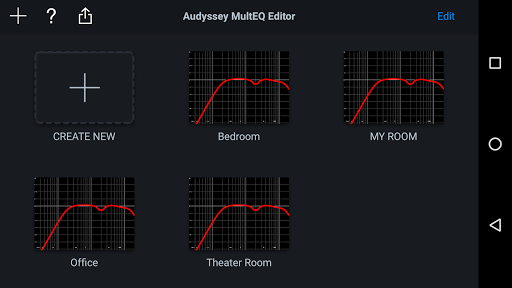
•View the speaker detection results, to check correct installation
•View before and after results of the Audyssey calibration, making it easy to identify room problems.
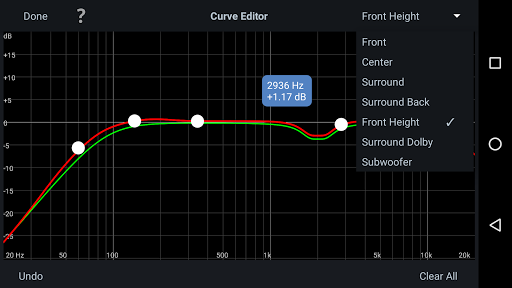
•Edit the Audyssey target curve for each channel pair to suit your tastes
•Adjust the overall EQ frequency rolloff for each channel pair
•Switch between 2 high frequency rolloff target curves
•Enable/Disable midrange compensation to make the sound brighter or smoother
•Save and load calibration results
This app requires specific hardware in your product to function: please double-check that your Denon or Marantz model is supported - see list below - before purchasing.
•Multi-Language Support (English, French, German, Spanish, Italian, Dutch, Swedish, Polish, Russian, Japanese and Simplified Chinese. The OS language setting is automatically detected; when not available, English is selected.)
Compatible models: (Product availability varies depending on regions.)
Denon AV Receiver: AVR-X6300H, AVR-X4300H, AVR-X3300W, AVR-X2300W, AVR-X1300W, AVR-S920W, AVR-S720W, AVR-S930H, AVR-S730H, AVR-X1400H, AVR-X2400H, AVR-X3400H, AVR-X4400H, AVR-X6400H, AVR-X8500H, AVR-S740H, AVR-S940H, AVR-X1500H, AVR-X2500H, AVR-X3500H, AVR-X4500H, AVR-X6500H, AVR-X1600H, AVR-X2600H, AVR-X3600H, AVR-S750H, AVR-S950H, AVR-A110, AVR-X6700H, AVR-X4700H, AVR-X3700H, AVR-X2700H, AVR-S960H, AVR-X8500HA, AVR-X1700H, AVR-S760H, AVR-A1H, AVR-X4800H, AVR-X3800H, AVR-X2800H, AVR-S970H, AVR-X1800H, AVR-S770H, AVR-X6800H, AVR-A10H
Marantz AV Receiver: AV7703, SR7011, SR6011, SR5011, NR1607, NR1608, SR5012, SR6012, SR7012, SR8012, AV7704, AV8805, NR1609, SR5013, SR6013, SR7013, AV7705, NR1710, SR5014, S6014, SR8015, SR7015, SR6015, SR5015, NR1711, AV7706, AV8805A, AV 10, CINEMA 30, CINEMA 40, CINEMA 50, CINEMA 60, CINEMA 70s, AV 20
Not compatible with Denon and Marantz models other than those listed above.
Compatible Android devices:
•Android Smartphones with Android OS ver.5.0 (or higher)
•Screen resolution: 800x480, 854x480, 960x540, 1280x720, 1280x800, 1920x1080, 1920x1200, 2048x1536
* This application does not support smartphones in QVGA (320x240) and HVGA (480x320) resolution.
* This application does not support smartphones of less than 2GB RAM capacity.
Confirmed Android devices:
Samsung Galaxy S10 (OS 12), Google (ASUS) Nexus 7 (2013) (OS 6.0.1), Google (LG) Nexus 5X (OS 8.1.0), Google Pixel 2 (OS 9), Google Pixel 3 (OS 12), Google Pixel 6 (OS 13)
Caution:
We do not guarantee that this application works with all Android devices.
What's New
Version Information
- Version
- 1.13.5
- Downloads
- 50K+
- Updated on
- Nov 30, 2025
- Released
- Apr 3, 2017
- Requires
- Android 5.0
Statistics
Google Play Rating History
Rating Distribution
Downloads Over Time
Audyssey MultEQ Editor app has been downloaded times. Over the past 30 days, it averaged downloads per day.
Shaded area shows 30-day prediction based on historical trends
Historical data collection started recently. More data points will be available over time.
Audyssey MultEQ Editor app - Google Play Rankings
Top Rankings
| Rank | Country | Category | List | Change |
|---|---|---|---|---|
| — |
Ranking History in
No ranking data available yet. Rankings are updated daily.
#12 in Top Paid Music And Audio in United States
#4 in Top Paid Music And Audio in Germany

#8 in Top Paid Music And Audio in France

#9 in Top Paid Music And Audio in Canada

Audyssey MultEQ Editor app users say on Google Play
 Tony Horwell
Wow! Transformed my already great audio system's sound. I was apprehensive about getting this app, due to some of the negative comments, but honestly it's worth every penny for 20 quid (although I would suggest putting up the purchase price of the Amp & bundle it in for the wonders it brings). I have a Denon Avr x3800h & it sounded so much better as standard than my previous Sony1080. But Adding AUDYSSEY MultEQ it has transformed my rooms acoustics into another dimension. Well worth It!
 Janne Mehtoma
Can't change requency range with my S10. Slider does not works. Pleace fix it! It is only reason why i buyed this software. -> Fixed
 Robert Hurlburt
In case others hit this, versions newer than 1.7.2 have a bug where your subwoofer trim gets set to -12db (max lowest trim) no matter how low you set the subwoofer gain. Still no word on a fix from them so I'm using v1.7.2 as a workaround. If you're getting -12 on the sub, try lowering the gain and re-run the calibration, but if you keep getting -12 then this is the bug I'm describing. Only an issue with the android app. The MultEQ app is an improvement but would be nice if they fixed this bug.
 Brian Hilbert
It's very annoying to have to pay for the app to access settings on Denon receivers. And while it's mostly straightforward to use, you still basically need to read online to understand some settings. It's also just a poor use case for a whole standalone app, when the entire point is to load settings on a receiver that has it's own UI that can do 70% of the app functions: the multi-eq frequency cutoff should be accessible without all this.
 Daniel Korgel
Incredibly frustrating - 3 hours for a single measurement. The app keeps disconnecting randomly during the measurement workflow and then discards everything and forces you to start from scratch. And that is already with my Denon connected via LAN and my phone directly next to the router. If you plan to use this expensive app for your expensive AVM, save a whole day for it. The UX is a joke.
ApkTrusted Ratings & Reviews
More from D+M Group
See more apps




Similar Apps

Napster - AI Music & Experts
Free

Fender Play: Music Lessons
Free

Chaos Audio
Free
SoundHound ∞ - Music Discovery
Paid

INTEGRA CONTROL
Free

Audacy: Radio & Sports Talk
Free
Boom: Bass Booster & Equalizer
Free

Jabra Sound+
Free

UE | BOOM by Ultimate Ears
Free

Symfonik
Paid

PodBot - podcast player
Paid

Sonos S1 Controller
Free
Thomann Official
Free

ReSound Smart 3D
Free

GNC
Free

Rheem EcoNet
Free
Scan this QR code to download

Forwarding you to the page at Google Play market in seconds...
Open Google Play market now