
Ultium PowerUP v1.0.6
General Motors (GM)
About this app
Developer Description
Ultium PowerUP Level 2 charger setup and access
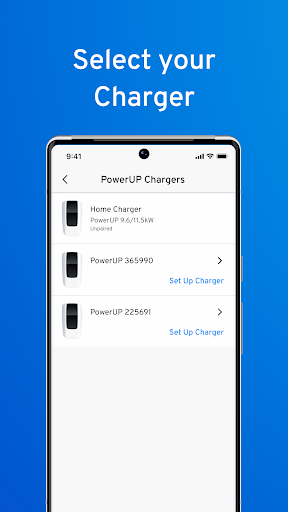
With the Ultium PowerUP app, you can connect to your GM PowerUP wall charger (when in Bluetooth range) to set up and customize your charging experience.
SET YOUR CHARGE
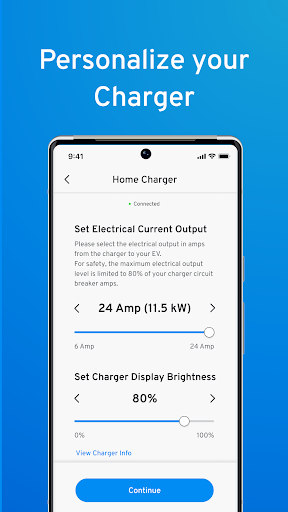
Set your power level. Don’t need a quick charge? Adjust your current settings down from the max 11.5kW. Protect the grid when demand is highest.
MAKE IT YOURS
Personalize your PowerUP Wall Charger and make it your own with options to name your charger and adjust LED light intensity
What's New
Version Information
- Version
- 1.0.6
- Downloads
- 5K+
- Updated on
- Jul 18, 2025
- Released
- Aug 24, 2022
- Requires
- Android 10
Statistics
Google Play Rating History
Rating Distribution
Downloads Over Time
Ultium PowerUP has been downloaded times. Over the past 30 days, it averaged downloads per day.
Shaded area shows 30-day prediction based on historical trends
Historical data collection started recently. More data points will be available over time.
Ultium PowerUP users say on Google Play
 Kumar Golap
I have to give it a 5 star as it does exactly what it said. It is to connect via bluetooth to set the current and to connect the charger to wifi. The wifi is not for the benefit of the user to check the state of charging or stats. The wifi is for GM's purpose only; they may use it to push some update when they feel like it. Yes you the user cannot check if there is an update for the firmware. And it is for GM to listen and collect stats of your use and most probably sell it to home insurers.
 Kenneth Chac
Does what it says but would be nice to have additional features like connecting to the internet and is equipped with advanced features like Create schedules to take advantage of lower utility rates, restrict access, see your usage history, and get real-time charging notifications. I can't seem to get connected to the charger via wifi.
 David Rosa
I didn't have particularly high expectations for this app. I simply needed a method to connect to my existing PowerUp+ level 2 charger to configure the breaker setting. The app paired with the charger just fine via Bluetooth. Once paired, the app provides the option to configure wi-fi. I thought this would be convenient, but the field for entering the wi-fi password has a character limit (?!?) less than the length of my wi-fi password. One has to wonder who designed this app this way?
 Jim S.
I constantly get a Wi-Fi password incorrect error. I know my password. I even copied the password from my 2.4 network provider's app and pasted it in the password field. Still received a password error. What a POS app. MyChevrolet won't connect either. I get the same message. I'm thinking there is a character requirement or something weird that is giving me that error. I even took my work phone, stood right next to the charger, and it connected without any issues.
ApkTrusted Ratings & Reviews
More from General Motors (GM)
See more apps






Similar Apps








Scan this QR code to download

Forwarding you to the page at Google Play market in seconds...
Open Google Play market now