
Family Link parental controls vVARY
Google LLC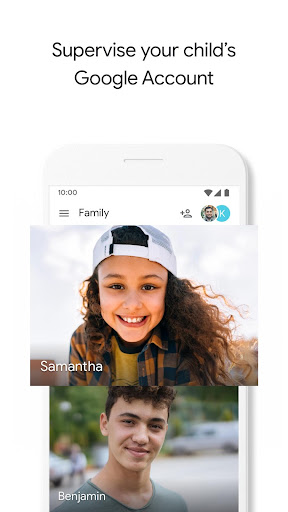
About this app
Developer Description
Download this app to your child/teen’s device to use Family Link.
Try the Family Link parental controls app from Google. Whether your children are younger or in their teens, the Family Link app lets you set digital ground rules remotely from your own device to help guide them as they learn, play, and explore online. For children under 13 (or the applicable age of consent in your country), Family Link also lets you create a Google Account for your child that's like your account, with access to most Google services.
With Family Link parental controls, you can:
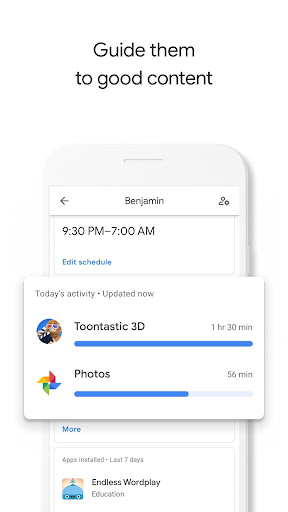
Guide them to good content
• View app their activity - Not all screen time is the same. Help your child make healthy decisions about what they do on their Android device, with activity reports showing how much time they’re spending on their favorite apps. You can see daily, weekly, or monthly reports.
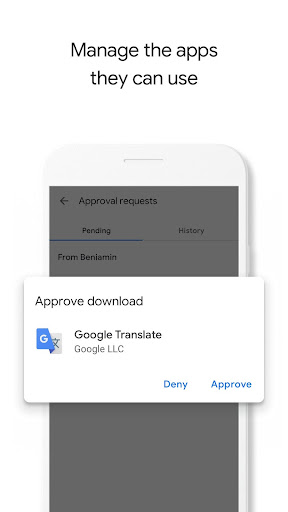
• Manage their apps - Handy notifications let you approve or block apps your child wants to download from the Google Play Store. You can also manage in-app purchases, and hide specific apps on their device all remotely from your own device.
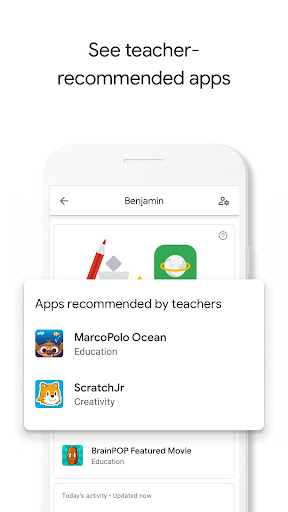
• Feed their curiosity - It can be hard to figure out what apps are right for your child, so Family Link shows you teacher-recommended apps on Android that you can add directly to their device.
Keep an eye on screen time
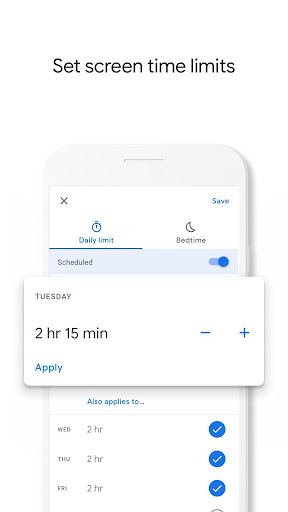
• Set limits - It’s up to you to decide the right amount of screen time for your child. Family Link lets you set time limits and a bedtime for their supervised devices, so you can help them find a good balance.
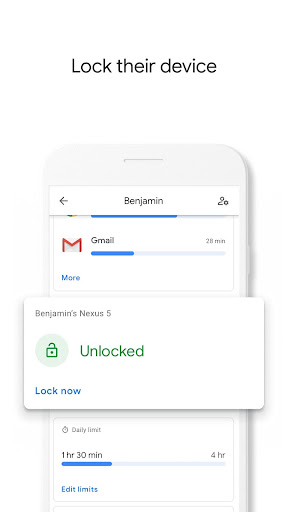
• Lock their device - Whether it’s time to go play outside, have dinner, or just spend time together, you can remotely lock a supervised device whenever it’s time to take a break.
See where they are
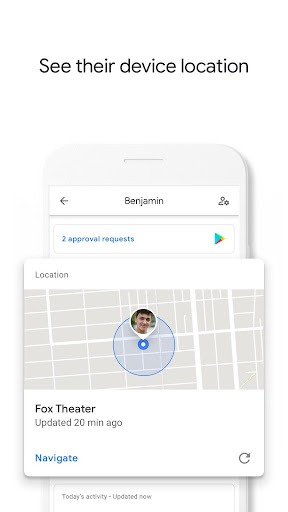
• It’s helpful to be able to find your child when they’re on the go. You can use Family Link to help locate them as long as they’re carrying their Android device.
Important Information
• Family Link’s tools vary depending on your child’s device. See a list of compatible devices at families.google.com/familylink/setup
• While Family Link helps you manage your child's purchases and downloads from Google Play, they will not need approval to install app updates (including updates that expand permissions), apps you have previously approved, or apps that have been shared in Family Library. Parents should regularly review their child’s installed apps and app permissions in Family Link.
• You should carefully review the apps on your child’s supervised device and disable those you don’t want them to use. Note that you may not be able to disable some pre-installed apps.
• To see the location of your child or teen’s device, it must be powered on, recently active, and connected to the internet.
• Teacher-recommended apps are only available on Android devices in the US to parents of children of certain ages.
• While Family Link provides tools to manage your child’s online experience, it does not make the internet safe. Rather, it is intended to give parents choices about how their kids use the internet, and encourage conversations about internet use.
What's New
Version Information
- Version
- -
- Downloads
- 50M+
- Updated on
- Oct 23, 2025
- Released
- Sep 17, 2018
- Requires
- Android 6.0
Statistics
Google Play Rating History
Rating Distribution
Downloads Over Time
Family Link parental controls has been downloaded times. Over the past 30 days, it averaged downloads per day.
Shaded area shows 30-day prediction based on historical trends
Historical data collection started recently. More data points will be available over time.
Family Link parental controls users say on Google Play
 Carter Saunders
say if you do get rid of this well nice but what if you still have it on even as your 18/19 then what can you do then who knows but hey if your a parent and you zero percent trust your kid then get it. yeah just a thought that should be taken into mind anways hope this helps with whatever who's thinking ok adiós people and chow and every good bye i can say and good luck btw and if you dont understand by the wayis the meaning in btw anyways peace ✌
 Jackson Rich
4ish Stars, might be the only good one to use for kids sadly. it's super annoying how long it often takes to let you use apps again the next day after you used up your time, it's super annoying so I had to turn off notifications
 Amēlija
Quite ok app to limit your child's screen time and apps they use, but there's several issues - Firstly, when phone locked for a week (or other time?) it keeps showing "Phone locked for a week" screen every. single. time. you unlock your phone. It's even more annoying for me with a slow phone as the screen takes a while to load. As far as Ik, there's no way to remove it. Same thing with persistent notifications. Also hate that apps like weather get locked for no reason and can't be unlocked solo
 mrman yes
Great if you want to lock your child's fun. 2 stars because I used it on myself to build discipline and it worked pretty well. I thought the reviews on battery life diminishing were fake, until I uninstalled it. After I uninstalled it, my battery life went down so much it's not even funny.
 Yahia Ayman
I am supervised, and I am mature enough to say, yes this has TOTALLY improved my screen time. It's just really laggy and doesn't work well now with it's new updates. E.g., when screen time is over, it takes about 1 minute to show the message and makes everything crash and really laggy. Also same for downtime. I also think there should be an option like: send your parents a request for screen time. Because sometimes you are not right next to them. Also, all apps close from recent centre, next day
ApkTrusted Ratings & Reviews
More from Google LLC
See more apps
Chrome Beta
Free

Magnifier
Free

Chrome Dev
Free

Chrome Canary (Unstable)
Free

Lookout - Assisted vision
Free

Fitbit
Free

Test DPC
Free

Google Chrome
Free

Accessibility Scanner
Free

Compose Material Catalog
Free

Action Blocks
Free

Sound Amplifier
Free

Switch Access
Free

Reading mode
Free

Pixel Camera
Free

Android AICore
Free
Similar Apps
Parental Control - Kidslox
Free
Alli360 by Kids360
Free

Kids360: Parental Control App
Free
Parental Control App- FamiSafe
Free
Parental Control App Blocker
Free
FlashGet Kids:parental control
Free
Qustodio Parental Control App
Free

AirDroid Parental Control
Free

Findmykids: Kids GPS Tracker
Free

Family Nest: Private Locator
Free

AirDroid: File & Remote Access
Free

Screen time: App blocking
Free

KidsGuard Pro-Phone Monitoring
Free

TeamViewer Remote Control
Free

App Usage - Manage/Track Usage
Free

CrookCatcher • Anti-Theft
Free
Scan this QR code to download

Forwarding you to the page at Google Play market in seconds...
Open Google Play market now