OUTLANDER PHEV Remote Ctrl vVARY
Mitsubishi Motors Corporation


About this app
Developer Description
MITSUBISHI Remote Control allows you to customize your Outlander PHEV.
For Troubleshooting and our FAQ, please visit our MITSUBISHI Remote Control website here:
https://www.mitsubishi-motors.com/en/products/outlander_phev/app/remote/reference.html
-------------------------------------------------
MITSUBISHI Remote Control allows you to customize your Outlander PHEV (model : GG2W/GG3W) experience from your Android phone.
When you connect to your PHEV’s wireless LAN, you can:
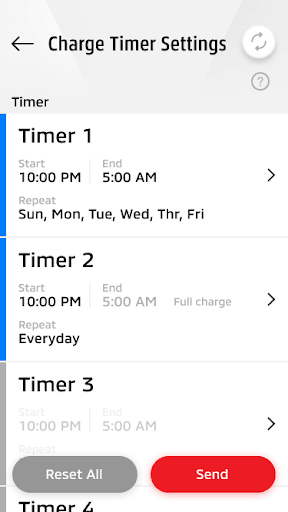
- Charge your vehicle on a timer or on demand
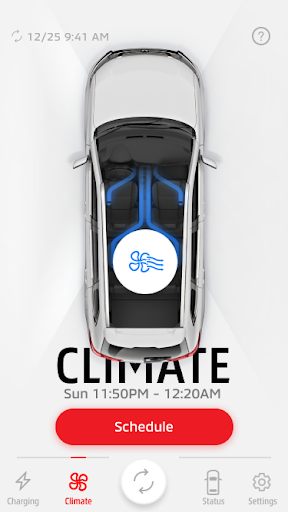
- Heat or cool your car before your drive
- Set timers to ensure your PHEV charges completely and avoid peak rate hours
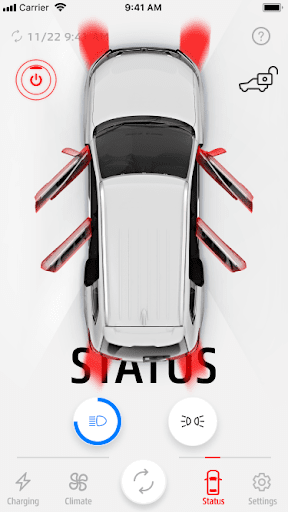
- Turn on your headlights or parking lights to help locate your vehicle
- Check your vehicle status
The MITSUBISHI Remote Control lets you view all vehicle settings in an intuitive dashboard. Manage timer settings for charging and climate control, monitor battery status and performance, and set customized weekly schedules to reflect your lifestyle, directly from your connected device.
Please note: Your Outlander PHEV communicates with this app exclusively via Wireless LAN, not by cellular technology. Wireless LAN communication can be hindered by distance, radio waves, or physical barriers.
MITSUBISHI Remote Control is a renewed and unified experience combining and replacing the prior “OUTLANDER PHEV”, “OUTLANDER PHEV I” applications. This app is intended to provide the same functionality (and more) in an improved user interface.
For users of the earlier applications:
- “OUTLANDER PHEV” : If you are using this app, you may need to contact the nearest Authorized Mitsubishi Dealership to implement the service campaign of the security upgrade.
- “OUTLANDER PHEV I” : Please download this new MITSUBISHI Remote Control app and re-register.
For Troubleshooting and our FAQ, please visit our MITSUBISHI Remote Control website here:
https://www.mitsubishi-motors.com/en/products/outlander_phev/app/remote/jizen.html
What's New
- Performance improvement
Version Information
- Version
- -
- Downloads
- 100K+
- Updated on
- Oct 14, 2025
- Released
- Jan 31, 2017
- Requires
- Android Varies with device
Statistics
Google Play Rating History
Rating Distribution
Downloads Over Time
OUTLANDER PHEV Remote Ctrl has been downloaded times. Over the past 30 days, it averaged downloads per day.
Shaded area shows 30-day prediction based on historical trends
Historical data collection started recently. More data points will be available over time.
OUTLANDER PHEV Remote Ctrl users say on Google Play
 Gwen J Marshall
don't even bother. I'll save my money n ey and have a mechanic do it.
 Bjørn Erik
This app has been a thron in the side for the longest time, especially for PHEV owners up north in the cold. Me and many other owners have resorted to other means to reach the cars wifi as well as avoiding using the app all together. After the last update how ever, the user experience got a lot better due to the network switch query you added and seemingly fixed some stability issues. Thank you Mitsubishi app devs!
 Pet Va
This review is for everyone who has problems registering and connecting the phone to the car! 1. When registering the phone with the car, put the phone on flight mode and only switch on the WiFi 2. When starting the app, make sure the Bluetooth is OFF, and then the connection will be OK Hopefully, this helps I emailed the developer one month ago, but there is no improvement yet
 Mick Wall
Very temperamental. Only seems to have limited functionality. Would benefit from ability to lock / unlock via the app. Very limited range (distance) of operation, would benefit from ability to show location (see BMW equivalent app). Only seems to operate predictably if you are away from a WiFi connection that your phone connects to automatically and if you have your mobile device's location turned on. Poor app but at least it's free, I wouldn't pay for it if it wasn't.
 Tarlochan Grewal (Raj)
The most Bug ridden unreliable app on Play Store Google should delete it. Seems Mitsubishi thought "oh Tesla and others have apps for their cars, let's do one too" and then "developed" this piece of junk with no thought or design. App takes ages to connect to car 4 feet away even with strong wifi signal. If it ever connects... it is random if it will connect or not. Actually quicker to go out to car and turn on charger or climate control. An app has to be useful this is not one that is useful.
ApkTrusted Ratings & Reviews
More from Mitsubishi Motors Corporation
See more apps


Similar Apps
SmartRace for Carrera Digital
Paid
myBuick
Free

ev.energy: Home EV Charging
Free

5Wheels
Paid
Froling Connect
Free

BISSELL Connect
Free

Ford™
Free

PlugShare - EV & Tesla Map
Free
myChevrolet
Free

TruckSmarter Load Board & Fuel
Free

Miele app – Smart Home
Free
myCadillac
Free
Automile
Free

Auto Agent
Free

Car Rental Near Me
Free
OBD Fusion (Car Diagnostics)
Paid
Scan this QR code to download

Forwarding you to the page at Google Play market in seconds...
Open Google Play market now