
Smart App Manager v5.1.3
SMARTWHO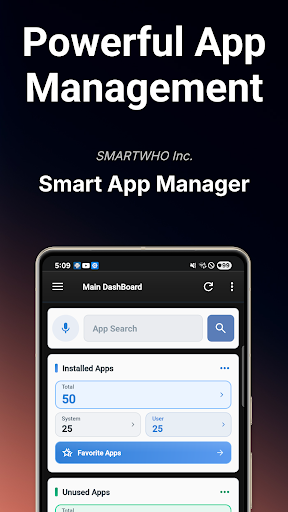









About this app
Developer Description
All-in-one app manager: uninstall, backup, usage analysis, security check.
Powerful search and sorting functions support smart app management even faster.
Customized app recommendations based on app usage patterns and unused app cleanup functions allow for even more efficient management.
In addition, you can check the permissions used by apps at a glance, taking security and privacy into consideration.
[Main features]
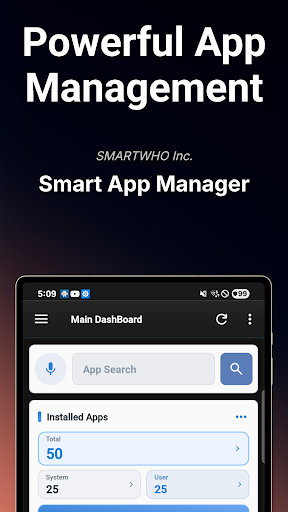
■ Main Dashboard
- Provides information on installed and unused apps
- Provides information on memory, storage, and battery
- Provides analysis of frequently used apps, security diagnosis, permission diagnosis, and app push status
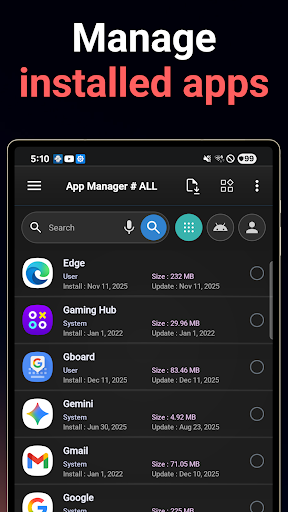
■ App Manager
- Easily sort apps by app name, installation date, and app size through powerful search and sorting functions
- Efficient and easy app management with support for multiple selection deletion and backup
- Check the list of installed apps and provide detailed information
- Supports app evaluation and comment writing functions
- Provides data and cache management functions
- Checks information on used memory and file capacity
- Provides app installation date inquiry and update management functions
■ Favorite Apps
- Easily run apps registered by users from the home screen widget
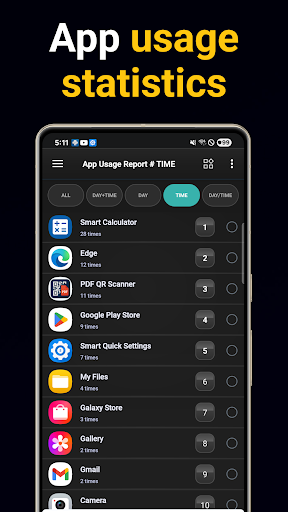
■ App Usage Analysis
- Analyzes frequently used apps by day of the week and time zone
- Provides automatic recommended app shortcuts in the notification area
- Provides usage count and usage time information for each app
- Supports the function to exclude specific apps from the app usage report
■ Unused Apps
- Supports efficient app management by automatically listing apps that have not been used for a certain period of time
■ App Deletion Suggestions
- Provides information on apps that have not been used for a certain period of time Provides apps as a list to support easy deletion
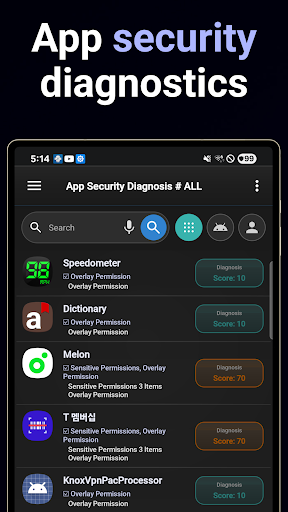
■ App security diagnosis
- Checks the security of installed apps and provides results
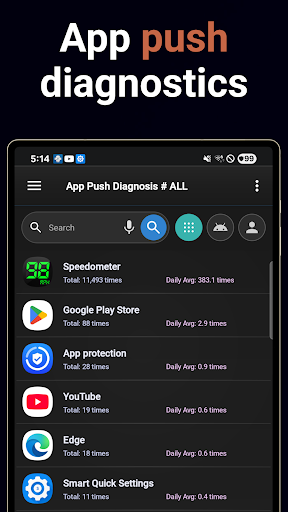
■ App push diagnosis
- Provides statistical data on the number of push alarms sent from apps
■ App permission diagnosis
- Provides a function to check permissions used by all apps installed on the smartphone
- Provides visualized permission usage request information
■ App backup and reinstallation
- Supports multiple selection deletion and restoration
- Provides backup and restoration functions to SD cards
- Supports installation of external APK files
■ System information
- Check various system information such as battery status, memory, storage space, and CPU information
■ Home screen widget
- Adjustable widget refresh time
- Various widget configurations such as comprehensive dashboard, favorite apps, and battery information
■ Notification area app recommendation system
- Provides customized app recommendation service reflecting user experience
[ Permission request guide]
■ Storage space permission
- Optional permission for using backup and reinstallation service
- Limited to reading and writing app installation APK files
■ App usage information permission
- Provides personalized app recommendation service based on usage statistics
- The collected data is used solely for statistical purposes, and **all data is stored only on your device** (it is never uploaded or shared externally).
■ App Push Notification Permission
- Collects the number of push notifications received for each app and provides users with push statistics by app.
- This permission only tracks the *count* of received notifications; it does not collect the content of notifications or any personal information.
- The collected data is used solely for statistical purposes, and **all data is stored only on your device** (it is never uploaded or shared externally).
What's New
- Reflection of user experience improvement projects
- UI/UX upgrades across the app
- Latest SDK upgrades and security enhancements
- Improved app launch speed and functionality
- App icon changes
- Bug fixes
Version Information
- Version
- 5.1.3
- Downloads
- 1M+
- Updated on
- Dec 11, 2025
- Released
- Dec 14, 2010
- Requires
- Android 7.0
Statistics
Google Play Rating History
Rating Distribution
Downloads Over Time
Smart App Manager has been downloaded times. Over the past 30 days, it averaged downloads per day.
Shaded area shows 30-day prediction based on historical trends
Historical data collection started recently. More data points will be available over time.
Smart App Manager users say on Google Play
 Chelsee Malibu Mickelson
I was SO in need of this! My phone gets overloaded with apps I forget to delete when I've gotten all the use out of them I want or am just done with them. More space for my pics, games, notes...
 -neil-
I got a pop up, looked like it was from Motorola, identifying my phone's model correctly. It was fake, close to being a scam. I haven't installed any apps lately, but updates happen all the time; an update must have included some malware. Android > Apps & notifications, does Not offer an option to "Sort By Install Date." Smart App Manager does without a problem, took me 5 seconds to find the Sort option menu. But it does Not provide "Sort by latest-UPDATE-date," which would have helped more.
 Chris Sayers
Nice app, I'd like to see the ability to print out a list of the installed apps, your app would get a five stars from me, if it could print.
 Penguin Wizard
Small usability issues persist. Like when you view an app info, your selection will be erased and you have to reselect. It is painful to do redo it.
 Mikey B
First tells me that I can't use the services / app after denying it notification permission??? Secondly I can't see any way inside the app to see what's actively running in the background and to stop them? Thirdly the move to sd card function is useless. It simply opens the app settings for you to do it manually and it the developer doesn't allow moving of its apps then you can't move it. I don't see any real usefulness in this app sorry. It's a 1 star and uninstall from me.
ApkTrusted Ratings & Reviews
More from SMARTWHO
See more apps




Similar Apps

Quick Settings app
Free

Enpass Password Manager
Free

AppDash: App Manager & Backup
Free

ASTRO File Manager & Cleaner
Free

Thunderbird Beta for Testers
Free

Sesame Search & Shortcuts
Free

fooView - FV Float Viewer
Free

ADW Launcher 2
Free

F-Secure Mobile Security
Free

Swift Backup
Free

Samsung My Files
Free

Spark Mail: AI Email, Calendar
Free

One Hand Operation +
Free
App Usage - Manage/Track Usage
Free

File Manager
Free

SafeInCloud 1
Paid
Scan this QR code to download

Forwarding you to the page at Google Play market in seconds...
Open Google Play market now