
Smart File Manager v5.0.0
SMARTWHO







About this app
Developer Description
Smart File Manager: Android storage management, file operations, built-in tools.
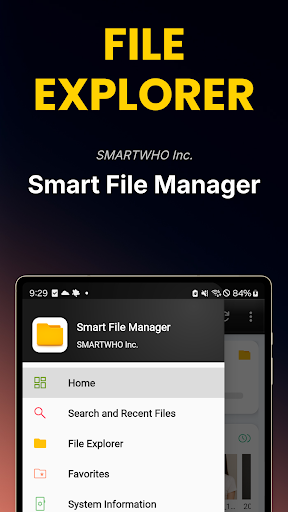
Smart File Explorer is an efficient file management tool for Android users. Like a PC explorer, it explores the built-in storage and external SD card, and allows various file operations such as copying, moving, deleting, and compressing.
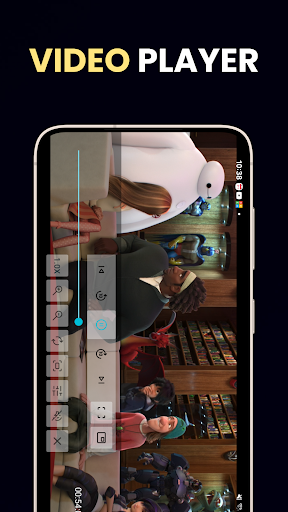
It also supports various built-in tools such as a text editor, video/music player, and image viewer.
It provides storage capacity and usage status visualization information and a quick search function for recent files, and ensures easy accessibility with a home screen widget. Use the file management functions you need conveniently in one place.
[Main functions]
■ File Explorer
- You can check the storage space of your Android phone and the contents of the external SD card
- Provides functions for searching, creating, moving, deleting, and compressing the stored contents
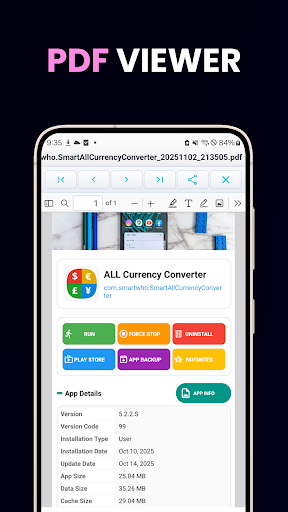
- Text editor, video player, music player, image viewer, PDF reader, HTML viewer, APK installer are Provided
■ Introduction to the main menu of the file explorer
- Quick connection: Quickly move to the folder set by the user
- Top: Move to the top of the folder
- Internal storage (Home): Move to the top root path of the storage space on the home screen
- SD card: Move to the top path of the external storage space, the SD card
- Gallery: Move to the location where files such as camera or video are stored
- Video: Move to the location where video files are stored
- Music: Move to the location where music files are stored
- Document: Move to the location where document files are stored
- Download: Move to the location of files downloaded from the Internet
- SD CARD: Move to the SD CARD path
■ Recent files / search
- Provides a quick search function for images, audio, videos, documents, and APK by period
- Provides a file search function
■ Storage information
- Provides the total storage capacity and usage status
- Provides statistics and visualization of images, audio, videos, documents, downloads, and recent files
- Supports quick connection with the file explorer
■ Favorites
- Supports a collection of favorites registered by the user and quick connection
■ System information (System info)
- Battery information (battery temperature - Provided in Celsius and Fahrenheit)
- Ram information (Total, Used, Available)
- Internal storage information (Total, Used, Available)
- External storage information - SD card (Total, Used, Available)
- CPU status information
- System / platform information
■ App information / settings
- Smart file explorer introduction
- Smart file explorer settings support
- Frequently used device settings section
: Sound, display, location, network, GPS, language, date and time Quick setting link support
■ Home screen widget
- Internal, external storage device information provided
- Favorite shortcut widget (2×2)
- Battery status widget (1×1)
[Caution]
If you delete, move, or perform related tasks arbitrarily without advanced knowledge of Android phones, problems may occur in the system. (Use caution)
In particular, be especially careful when using the storage space of the smart device itself, not the SD card storage space.
[Guide to essential access permission]
* Storage read/write, storage management permission: Essential when using various file explorer services. In order to use the main services of Smart File Manager, such as folder exploration and various file manipulation functions, storage access and management permissions are required.
Storage access permissions are optional and can be revoked at any time. However, in this case, the main app functions may not be available.
What's New
- File Explorer core engine upgrade
- Video player feature upgrade
- Music player feature upgrade
- Image viewer feature upgrade
- File Explorer built-in tools upgrade
- Various bug fixes
Version Information
- Version
- 5.0.0
- Downloads
- 1M+
- Updated on
- Oct 4, 2025
- Released
- Feb 21, 2011
- Requires
- Android 8.0
Statistics
Google Play Rating History
Rating Distribution
Downloads Over Time
Smart File Manager has been downloaded times. Over the past 30 days, it averaged downloads per day.
Shaded area shows 30-day prediction based on historical trends
Historical data collection started recently. More data points will be available over time.
Smart File Manager users say on Google Play
 A Google user
Well this is my one week re-review. This is the finest file manager app I have found in the playstore. Great functionality. Detects EVERYTHING in the phone. SIX STARS !!! I wanted to mention I have tried close to 20 file mgr apps from the playstore and Smart File Manager not only does what it says, it says what it does, and does it flawlessly. My choice, finally.
A Google user
Very good thanks
A Google user
I loved hability to increase font or make it bold. Thats useful 4 shortsighted ppl. I hated the small thumbnail size. I hated lack of shortcut to all pictures and all videos.
 freddy nunez
Stating my SD card is empty but went around and got in. Did not let me edit txt or paste file in SD card. i did like you change the font size to view my directories better.
A Google user
Can't move any files. It doesn't do what it promises to. Not worthy installing.
ApkTrusted Ratings & Reviews
More from SMARTWHO
See more apps




Similar Apps

Samsung My Files
Free

Calculator
Free

File Manager
Free

ASTRO File Manager & Cleaner
Free

File Manager
Free
Material Files
Free

Simple Gallery Pro
Paid

Explorer
Free

Gallery
Free

Super File Manager Explorer
Free

CSV File Viewer - Smart CSV
Free

Calculator Pro: Calculator App
Free

Total Commander - file manager
Free

RoboForm Password Manager
Free
Inkpad Notepad & To do list
Free

OfficeSuite Pro + PDF
Paid
Scan this QR code to download

Forwarding you to the page at Google Play market in seconds...
Open Google Play market now