
Microsoft Family Safety v2.0.5.1103
Microsoft Corporation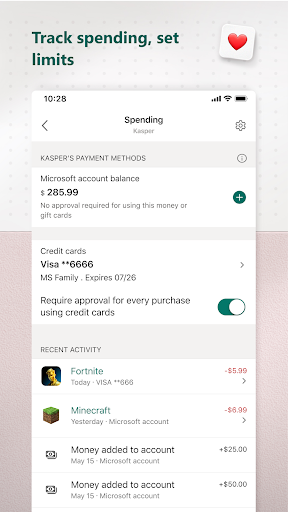
About this app
Developer Description
Monitor screen time and build healthy habits with Family Safety
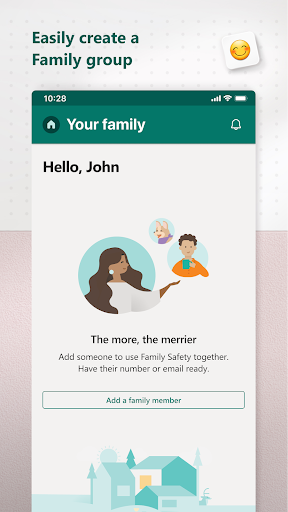
This app is designed for both parents and kids.
For parents, it helps to create a safe space for their children to explore online. Set parental controls to filter inappropriate apps and games and set browsing to kid-friendly websites on Microsoft Edge.
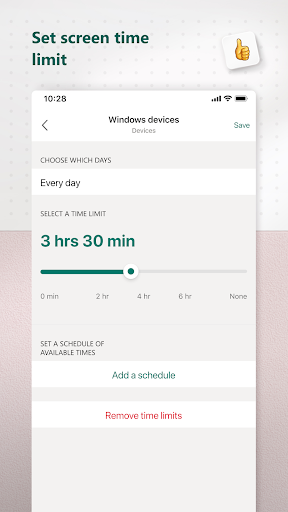
Help your kids balance their screen time activity. Set limits for specific apps and games on Android, Xbox, or Windows. Or use device management to set screen time limits across devices on Xbox and Windows.
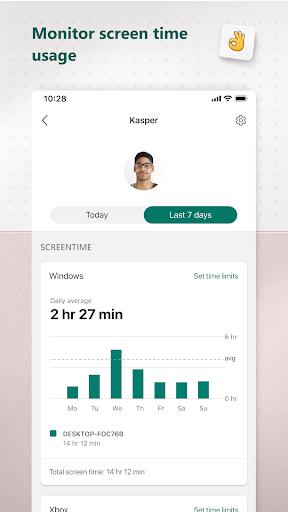
Use activity reporting to better understand your family's digital activity. View your kids’ activity in a weekly email to help start a conversation about online activity.
For kids, it ensures their safety in the digital world by adhering to parental controls and accessing age-appropriate content.
Microsoft Family Safety features:
Activity reports – Develop healthy digital habits
• Activity log of screen time and online usage
• Weekly email summary report of activity
Screen time – Find a balance
• Screen time app and game limits on Xbox, Windows, Android
• Screen time device limits on Xbox and Windows
• Get notified if your child requests more time
Content filters – Explore safely
• Web filters for kid-friendly browsing on Microsoft Edge
• Block inappropriate apps and games
Privacy & Permissions
Your privacy is important to us. We work around the clock to protect your data and information to help you keep your family safe. For example, we do not sell or share your location data with insurance companies or data brokers. We provide you with meaningful choices about how and why data is collected and used and give you the information you need to make the choices that are right for you and your family.
With your child’s consent, Microsoft Family Safety may collect interaction data using accessibility, app usage, and device admin service permissions. This allows us to: know when they are using an app, exit an app on their behalf, or block apps that are not allowed.
Disclaimers
This app is provided by either Microsoft or a third-party app publisher and is subject to a separate privacy statement and terms and conditions. Data provided through the use of this store and this app may be accessible to Microsoft or the third-party app publisher, as applicable, and transferred to, stored and processed in the United States or any other country where Microsoft or the app publisher and their affiliates or service providers maintain facilities.
Version Information
- Version
- 2.0.5.1103
- Downloads
- 5M+
- Updated on
- Dec 20, 2025
- Released
- Jul 17, 2020
- Requires
- Android 9
Statistics
Google Play Rating History
Rating Distribution
Downloads Over Time
Microsoft Family Safety has been downloaded times. Over the past 30 days, it averaged downloads per day.
Shaded area shows 30-day prediction based on historical trends
Historical data collection started recently. More data points will be available over time.
Microsoft Family Safety - Google Play Rankings
Top Rankings
| Rank | Country | Category | List | Change |
|---|---|---|---|---|
| — |
Ranking History in
No ranking data available yet. Rankings are updated daily.
#7 in Top Free Parenting in United States


#66 in Top Grossing Parenting in United States


#1 in Top Free Parenting in Australia


#4 in Top Free Parenting in Canada


Microsoft Family Safety users say on Google Play
 Jonty Soper
An extremely useful tool for helping keeping an eye on and protecting younger ones indulging in the digital age. Like all similar tools, grown-ups are key, in-control and must review and assess often - but tools like this aid that. Thank you Microsoft and well done!
 Kálmán Balázs
Instructions Lag behind
 Attila Katona
Update: Looks like MS reverted this change, but without changing the version number. Well done again. But at least after uninstall/reinstall works again. After the last update I just get this popup, XBox settings are no longer here, but you can manage them with the XBox Family Setting app. Ok, another app, but hey, what could possibly go wrong. So I click the conveniently offered link to the new XBox app, and then, bam: "This app is not available in your country." Thanks MS, you broke this too.
 Brian Fair
rough. The app asked for feedback but bugged and can't submit. I don't get notifications for more time requests on my phone but I do get emails. Clicking in the email opens the web page which I have to authenticate with instead of opening in the app. Then when I go into the app sometimes the notification is in the notifications area, but if I've accidentally looked at it and it goes away, I can't find the request easily again. managing time is my primary use case and it isn't easy.
 Noel Down
Can no longer add YouTube time on Xbox. The app gets the requests, but adding more time does nothing, YouTube remains blocked.
ApkTrusted Ratings & Reviews
More from Microsoft Corporation
See more apps
Microsoft Authenticator
Free

Microsoft Bing Search
Free

Microsoft Azure
Free

MSN
Free

MSN Money- Stock Quotes & News
Free

MSN Weather - Forecast & Maps
Free

IoT Plug and Play
Free

Microsoft Build
Free

Microsoft Bing Webmaster Tools
Free

Link to Windows
Free

Warehouse Management
Free

Bing Wallpapers
Free

Microsoft Advertising
Free

Microsoft Identity Pass
Free

As Dusk Falls Companion App
Free

SMS Organizer
Free
Similar Apps

App Usage - Manage/Track Usage
Free

Duo Mobile
Free

Freedom: App & Website Blocker
Free

Okta Verify
Free

Confluence Cloud
Free

Authenticator App - OneAuth
Free

TeamViewer Remote Control
Free
Parental Control App- FamiSafe
Free

Parental Control - Kidslox
Free

Viva Engage
Free

Aegis Authenticator - 2FA App
Free

Workday
Free

Boosted Time Tracker
Free

monday.com - Work Management
Free

Qustodio Parental Control App
Free

SAP SuccessFactors Mobile
Free
Scan this QR code to download

Forwarding you to the page at Google Play market in seconds...
Open Google Play market now