
File explorer v0.70
KiteTech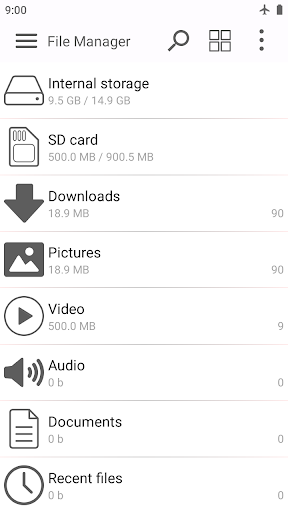



About this app
The File explorer app by KiteTech simplifies file navigation and management on Android devices, making it an ideal solution for individuals who frequently work with files on their mobile devices. This app is particularly beneficial for professionals and students who need to access and manage files on the go. Compared to other productivity apps in its category, File explorer stands out with its user-friendly interface and efficient file handling capabilities. However, its lack of advanced features may make it less appealing to power users who require more complex file management options.
Pros
- With over 1 million downloads and a 4.1-star rating, the File explorer app has demonstrated its reliability and effectiveness in meeting the needs of its users, indicating a high level of social proof and user satisfaction.
- The app's simple and intuitive interface makes it easy for users of all skill levels to navigate and manage their files, which is a significant advantage over more complex file management apps.
- The developer, KiteTech, has a professional website and provides a support email, which suggests a commitment to customer support and feedback, enhancing the overall user experience.
- The app's small size and compatibility with Android 4.3 and later versions make it accessible to a wide range of devices, including older models.
- The availability of in-app purchases for additional features provides users with the flexibility to customize their experience according to their needs.
Cons
- The presence of ads in the free version may be intrusive and disrupt the user experience, which could be a significant drawback for users who prefer ad-free environments.
- The app's lack of advanced features, such as cloud storage integration or file encryption, may limit its appeal to users who require more sophisticated file management capabilities.
- The monetization model, which includes in-app purchases, may lead to a fragmented user experience, with some features only available to paying users, potentially creating a sense of inequality among users.
- The app's permissions analysis reveals that it requests no permissions, which, while initially seeming like a positive aspect, raises questions about the app's ability to fully integrate with the device's file system and provide comprehensive file management functionality.
Best for: The ideal user for the File explorer app is a tech-savvy individual, likely a professional or student, who frequently works with files on their Android device and requires a reliable, user-friendly file management solution that can efficiently handle basic file operations, but may not need advanced features like cloud integration or encryption.
Developer Description
Simplifies file navigation and handles file operations effortlessly.
Features:
* Main storage and SD card access.
* Support for different file operations: copy, move, rename and delete.
* Sort files and folders by name, date, size and type.
* Different categories for files and folders.
* List view and grid view.
* Quick search for files and folders.
* Built in image viewer and text editor.
Privacy
Given that the File explorer app requests no permissions, the risk of data collection and privacy breaches appears to be minimal. However, users should still be cautious when using the app, especially when accessing sensitive files, and ensure that their device's overall security settings are up to date. It is also essential to monitor the app's future updates and permission requests, as changes in permission requests could indicate a shift in the app's data collection practices.
Tips
To get the most out of the File explorer app, users should first familiarize themselves with the app's interface and explore its various features, such as file sorting and searching. Additionally, users can optimize the app's performance by regularly cleaning up temporary files and closing unnecessary folders. For advanced users, exploring the in-app purchases can provide access to additional features that enhance the file management experience.
In-app purchases
$0.99 - $9.99 per item
Version Information
- Version
- 0.70
- Downloads
- 1M+
- Updated on
- Jan 2, 2026
- Released
- Jul 28, 2023
- Requires
- Android 4.3
Statistics
Google Play Rating History
Rating Distribution
Downloads Over Time
File explorer has been downloaded times. Over the past 30 days, it averaged downloads per day.
Shaded area shows 30-day prediction based on historical trends
Historical data collection started recently. More data points will be available over time.
File explorer users say on Google Play
 Zainab 0125
great area to store lot of things and also it's safe
 kyei baffour
very proud to use it because it has no complications
 Thanawat Charoenwibool
Very simple interface design, support internal storage and SD card. Unfortunately, it does NOT support any kind of internet connection, so transferring file from/to external storage device is impossible. Furthermore, it contains ads and mot free too.
 MacFarlane Miti
It's a nice app I just don't like giving stars any how.....
 S A
S A
not worth the try
ApkTrusted Ratings & Reviews
More from KiteTech
See more apps







Similar Apps
ZX File Manager
Free

EX File Manager
Free
File Manager
Free
RS File Manager File Explorer
Free

Super File Manager Explorer
Free
Material Files
Free

MediaFire
Free

File Manager
Free
RAR
Free
Cx File Explorer
Free

Uninstaller
Free

File Manager
Free

ZArchiver
Free

File Manager
Free

Explorer
Free

Total Commander - file manager
Free
Scan this QR code to download

Forwarding you to the page at Google Play market in seconds...
Open Google Play market now