
Google Family Link v2.66.0.2025w47.833755031
Google LLC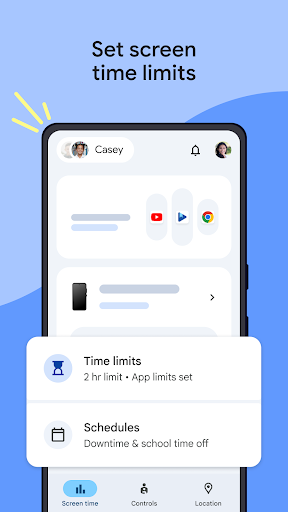


About this app
Google Family Link solves the problem of parental control and guidance for kids' device usage, benefiting parents and guardians who want to ensure their children's online safety and digital well-being. This app stands out in the Tools category due to its robust feature set and seamless integration with other Google services, making it a top choice for Android users. Compared to alternatives, Family Link's simplicity and effectiveness set it apart, although some users may find its features limited for older children. Overall, it's a reliable and trustworthy solution from a reputable developer.
Pros
- With over 100 million downloads and a 4.6-star rating, Google Family Link has demonstrated its effectiveness and user satisfaction, making it a top-tier app in the Tools category.
- The app's free model with no ads or in-app purchases ensures a distraction-free experience for both parents and children, aligning with Google's commitment to providing high-quality, user-centric services.
- Family Link's ability to set screen time limits, monitor app activity, and locate devices provides parents with comprehensive control and peace of mind, making it an essential tool for modern parenting.
- The app's regular updates and Google's reputation for security and privacy ensure that Family Link stays ahead of emerging threats and maintains a high level of protection for user data.
- The simplicity of the app's interface and its accessibility features make it easy for parents of all technical skill levels to navigate and utilize its full range of features.
Cons
- Some users may find the app's features too restrictive or limited for older children, who may require more autonomy and less supervision as they mature.
- The lack of support for certain device types or older Android versions might limit the app's compatibility and usefulness for some families.
- While Family Link excels at providing a safe environment, it may not offer the same level of customization or advanced features as some third-party parental control apps, potentially leaving some power users wanting more.
- The app's reliance on Google services means that users fully invested in other ecosystems (e.g., Apple) might find its integration and functionality less seamless.
Best for: The ideal user for Google Family Link is a parent or guardian of children under the age of 18, particularly those with younger children who are just beginning to use digital devices and require close supervision and guidance to ensure their online safety and digital well-being.
Developer Description
Guide kids with parental tools in Family Link.
With Family Link, you can:
Establish digital ground rules
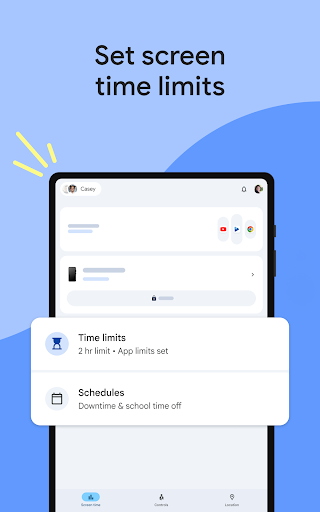
• Set screen time limits — Find the screen time that works best for your child. Family Link lets you set daily time limits, with school time and downtime schedules for their devices, so you can help your child find a healthy balance.
• Manage your child’s apps — Give your child the flexibility they need when it comes to app usage. Set individual app time limits, and unlimited time for educational or regularly used apps. You can block apps, too.
Manage content filters and security & privacy
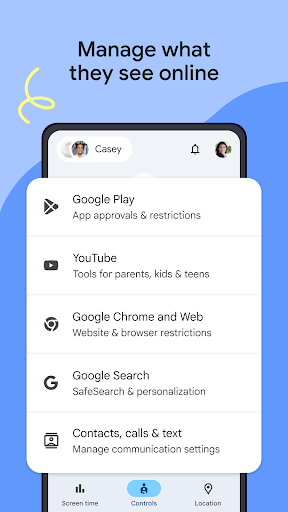
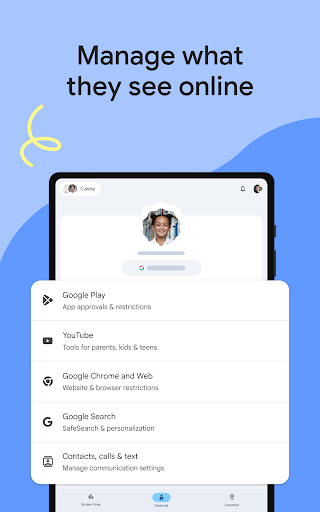
• Manage what they see online — Set up parental controls on Google services like Chrome, Play, YouTube, and Search. Family Link allows you to block inappropriate sites, require approval for new apps, manage permissions for apps and websites, and more.
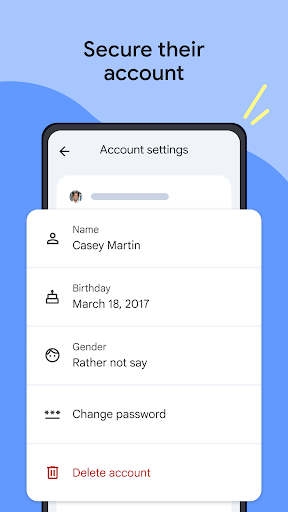
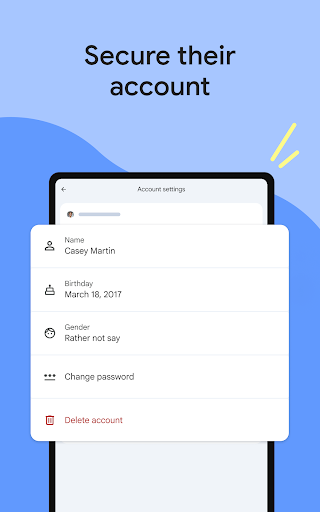
• Secure their account — Family Link gives you access to manage your child’s account and data settings. As a parent, you can help change or reset your child’s password if they forget it, edit their personal information or even delete their account if you feel necessary.*
*Children over the applicable age can manage their own account.
Stay connected on the go
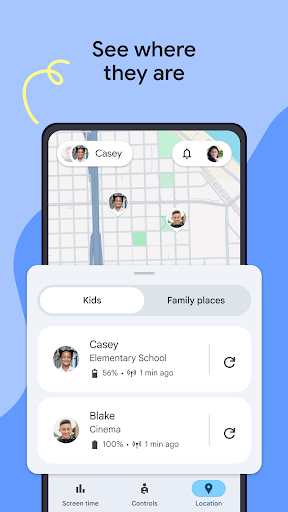
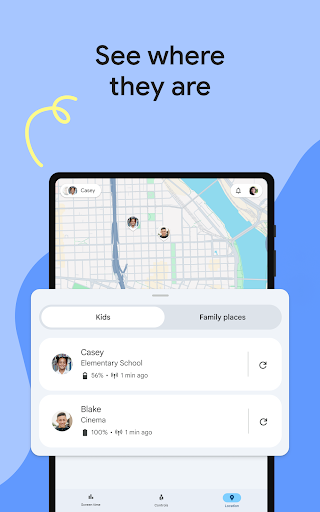
• See where they are — It’s helpful to be able to find your family when they’re on the go. With Family Link, you can locate your children on one map, as long as they’re carrying their device.
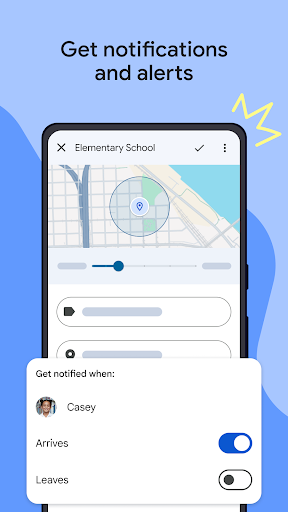
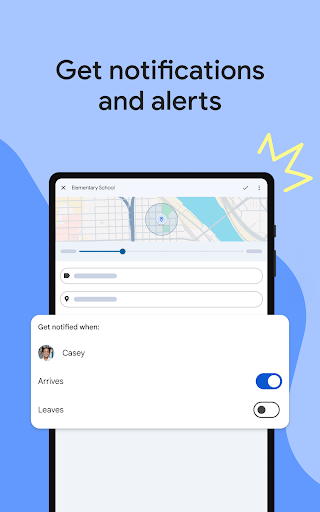
• Get notifications and alerts — Family Link delivers critical notifications including when your child arrives or leaves a certain location. You can also ring devices and view the device’s remaining battery life.
Important Information
• Family Link’s tools vary depending on your child’s device. See a list of compatible devices at https://families.google/familylink/device-compatibility/
• While Family Link helps you manage your child’s purchases and downloads from Google Play, they will not need approval to install app updates (including updates that expand permissions), apps you have previously approved, or apps that have been shared in Family Library. In addition, purchase approvals will apply only when your child makes a purchase through Google Play’s billing system and will not apply to purchases made through alternate billing systems. Parents should regularly review their child’s installed apps and app permissions in Family Link.
• You should carefully review the apps on your child’s supervised device and disable those you don’t want them to use. Note that you may not be able to disable some pre-installed apps such as Play, Google, etc.
• To see the location of your child or teen’s device, the device must be powered on, recently active, and connected to the internet through data or wifi.
• Family Link parental controls are only available for supervised Google accounts. With supervised Google Accounts, children get access to Google products like Search, Chrome, and Gmail, and parents can set up basic digital ground rules to supervise them.
• While Family Link provides tools to manage your child’s online experience and keep them safer online, it does not make the internet safe. Family Link can not determine the content on the internet, but it can give parents the opportunity to make decisions about how their child spends time on their device, and determine what path to online safety looks best for your family.
Privacy
Given that Family Link requires no permissions, it presents a very low risk in terms of data collection and privacy invasion, making it a safe choice for families. However, users should still be mindful of the data Google collects through its services and review the company's privacy policy to understand how their information is used. To further enhance security, ensure that all devices are updated to the latest Android version and that two-factor authentication is enabled on the Google account linked to Family Link.
Tips
For the best experience, start by setting clear goals and expectations with your child, then use Family Link to establish screen time limits and app restrictions that align with these goals. Regularly review the app's activity reports to identify areas where your child may need guidance or additional support. Additionally, take advantage of Google's family-oriented features, such as Family Groups, to create a cohesive and safe digital environment for your household.
What's New
Version Information
- Version
- 2.66.0.2025w47.833755031
- Downloads
- 100M+
- Updated on
- Dec 2, 2025
- Released
- Mar 15, 2017
- Requires
- Android 7.0
Statistics
Google Play Rating History
Rating Distribution
Downloads Over Time
Google Family Link has been downloaded times. Over the past 30 days, it averaged downloads per day.
Shaded area shows 30-day prediction based on historical trends
Historical data collection started recently. More data points will be available over time.
Google Family Link - Google Play Rankings
Top Rankings
| Rank | Country | Category | List | Change |
|---|---|---|---|---|
| — |
Ranking History in
No ranking data available yet. Rankings are updated daily.
#95 in Top Free Tools in United States


#33 in Top Free Tools in Poland


#34 in Top Free Tools in Argentina


#40 in Top Free Tools in Spain


Google Family Link users say on Google Play
 Marquita Chaney
love that I have the ability to protect my children on their phones. love this app
 Shannon Collins
This app is easy to navigate and has some very good features that allow you to manage your child's overall usage and individual apps. I have enjoyed using it. Recently though, it's not always automatically locking when the daily limit or downtime has been reached. This evening, my son's device had 2 min. left overall and half hour left until downtime. The next time I looked, the display said that the daily limit was off? I had to once again, manually lock it.
 Shaikh Sweety
nice
 Rasha Kilany
i find everyday a bonus time in my kids s phone .i didnt made it
 Olivia Elson
Great way to make your kid absolutely hate you. I find this app very dumb and if you want your kid to trust you DONT get it .SIMPLE. that's why your kid might not tell you stuff and probably don't talk to you. It's a stupid app ☺️
ApkTrusted Ratings & Reviews
More from Google LLC
See more apps
Chrome Beta
Free

Magnifier
Free

Chrome Dev
Free

Chrome Canary (Unstable)
Free

Lookout - Assisted vision
Free

Fitbit
Free

Test DPC
Free

Google Chrome
Free

Accessibility Scanner
Free

Compose Material Catalog
Free

Sound Amplifier
Free

Action Blocks
Free

Switch Access
Free

Reading mode
Free

Pixel Camera
Free

Android AICore
Free
Similar Apps

Kids360: Parental Control App
Free

Findmykids: Kids GPS Tracker
Free
FlashGet Kids:parental control
Free
Parental Control App- FamiSafe
Free

AirDroid Parental Control
Free
Parental Control - Kidslox
Free

AirDroid: File & Remote Access
Free
Parental Control App Blocker
Free
Qustodio Parental Control App
Free

TeamViewer Remote Control
Free

AnyDesk Remote Desktop
Free

iSharing: GPS Location Tracker
Free

Link to Windows
Free

Samsung Smart Switch Mobile
Free

KidsGuard Pro-Phone Monitoring
Free

SmartThings
Free
Scan this QR code to download

Forwarding you to the page at Google Play market in seconds...
Open Google Play market now