
Android Accessibility Suite vVARY
Google LLC





About this app
The Android Accessibility Suite solves the problem of accessibility for users with disabilities, providing tools such as TalkBack and the Accessibility Menu to assist with navigation and interaction. This app benefits users who are blind, have low vision, or have mobility impairments, offering a range of features that make Android devices more usable. Compared to alternatives in the Tools category, the Android Accessibility Suite stands out due to its comprehensive set of features and seamless integration with the Android operating system. However, some users may find the suite's complexity and numerous options overwhelming, which can make it difficult to navigate for those without experience with accessibility tools.
Pros
- With over 10 billion downloads, the Android Accessibility Suite has an unparalleled level of social proof, demonstrating its widespread adoption and trust among users.
- The app's rating of 4.0 out of 5 stars indicates a high level of user satisfaction, with many users praising its effectiveness in improving device accessibility.
- As a product from Google LLC, the Android Accessibility Suite benefits from the company's reputation for developing high-quality, user-centric software, which is evident in the suite's polished interface and robust feature set.
- The app's offline capability ensures that users can access its features even without an internet connection, making it a reliable tool for daily use.
- The Android Accessibility Suite is free to download and use, with no ads or in-app purchases, providing a seamless and distraction-free experience for users.
Cons
- Some users may find the Android Accessibility Suite's complexity and numerous options overwhelming, which can make it difficult to navigate for those without experience with accessibility tools.
- Although the app does not request any permissions, some users may be concerned about the potential for data collection by Google, given the company's history of data-driven business practices.
- The Android Accessibility Suite may not be compatible with all devices or Android versions, which could limit its availability for some users.
- Some users have reported issues with the app's performance, including occasional crashes or slow response times, which can be frustrating for those who rely on the suite for daily use.
Best for: The ideal user for the Android Accessibility Suite is an individual with a disability, such as a visual or mobility impairment, who requires assistive technology to interact with their Android device, and is likely to be technically savvy enough to navigate the suite's features and settings, but may also benefit from the app's intuitive interface and comprehensive guidance.
Developer Description
Includes TalkBack, Accessibility Menu, and more.
Android Accessibility Suite includes:
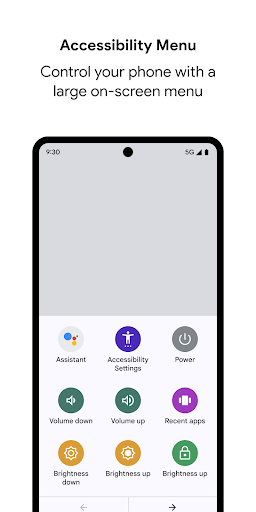
• Accessibility Menu: Use this large on-screen menu to lock your phone, control volume and brightness, take screenshots, and more.
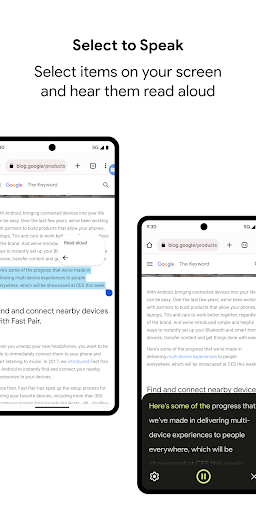
• Select to Speak: Select items on your screen and hear them read aloud.
• TalkBack screen reader: Get spoken feedback, control your device with gestures, and type with the on-screen braille keyboard.
To get started:
1. Open your device's Settings app.
2. Select Accessibility.
3. Select Accessibility Menu, Select to Speak, or TalkBack.
Android Accessibility Suite requires Android 6 (Android M) or later. To use TalkBack for Wear, you'll need Wear OS 3.0 or later.
Permissions Notice
• Phone: Android Accessibility Suite observes the phone state so it can adapt announcements to your call status.
• Accessibility Service: Because this app is an accessibility service, it can observe your actions, retrieve window content, and observe text that you type.
• Notifications: When you allow this permission, TalkBack can notify you about updates.
Privacy
Given that the Android Accessibility Suite does not request any permissions, users can be confident that their data is not being collected or shared without their consent. However, as with any Google product, users should be aware of the company's data collection practices and review the app's terms of service to understand how their data may be used. To ensure the app's security, users should keep their device and the Android Accessibility Suite up to date with the latest software updates.
Tips
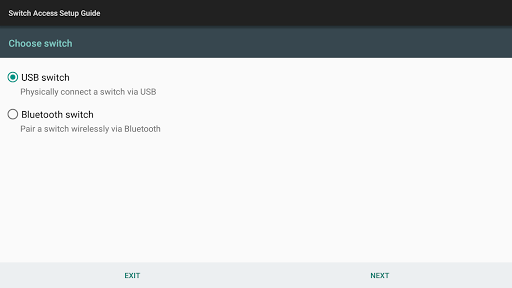
To get the most out of the Android Accessibility Suite, users should start by exploring the TalkBack feature, which provides a comprehensive introduction to the app's accessibility tools. Users can also customize the suite's settings to suit their individual needs, such as adjusting the font size or screen reader settings. Additionally, users can integrate the Android Accessibility Suite with other accessibility tools, such as switch access or voice commands, to create a personalized accessibility solution.
What's New
• New settings categories
• New gesture to start voice dictation quickly
• Announcements for text formatting changes
• New gesture to navigate phone easily
• Enhanced keyboard support with new shortcuts, tutorial, and browse mode for web navigation
• New movable speech bubble
Version Information
- Version
- -
- Downloads
- 10.0B+
- Updated on
- Jan 12, 2026
- Released
- Feb 3, 2026
- Requires
- Android Varies with device
Statistics
Google Play Rating History
Rating Distribution
Downloads Over Time
Android Accessibility Suite has been downloaded times. Over the past 30 days, it averaged downloads per day.
Shaded area shows 30-day prediction based on historical trends
Historical data collection started recently. More data points will be available over time.
Android Accessibility Suite users say on Google Play
 Rajkumar Kubiraj
very good
 Haadha Kennaa
Nice
 Whenu Kosu
it took long to load kindly help solve it.
 Russ
Russ
highly invasive
 B
B
dont use at all
ApkTrusted Ratings & Reviews
More from Google LLC
See more apps
Chrome Beta
Free

Chrome Dev
Free

Chrome Canary (Unstable)
Free

Magnifier
Free

Fitbit
Free

Lookout - Assisted vision
Free

Test DPC
Free

Google Chrome
Free

Accessibility Scanner
Free

Compose Material Catalog
Free

Action Blocks
Free

Sound Amplifier
Free

Switch Access
Free

Reading mode
Free

Pixel Camera
Free

Android AICore
Free
Similar Apps

AnyDesk Remote Desktop
Free

TECNO SPOT
Free
Microsoft SwiftKey AI Keyboard
Free

File Manager
Free

TeamViewer QuickSupport
Free

Microsoft OneDrive
Free

Hi Translate - Chat translator
Free

Uninstaller
Free

Text reader - text and voice
Free

Sleep as Android: Smart alarm
Free

SmartThings
Free

Messenger
Free

Truecaller: Spam Call Blocker
Free

SoundCloud: The Music You Love
Free

spacedesk - USB Display for PC
Free
Messages - SMS Texting App
Free
Scan this QR code to download

Forwarding you to the page at Google Play market in seconds...
Open Google Play market now