TinyLaunch with toddler lock v0.14
Omega Centauri Software

About this app
Developer Description
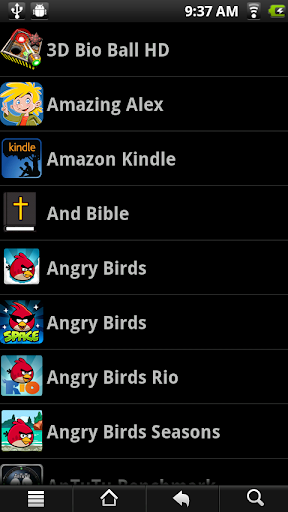
Super-light launcher for limited devices and to hide apps from toddlers
If you want to use even less memory, you can press MENU (or "..."), Settings, and remove the app icons.
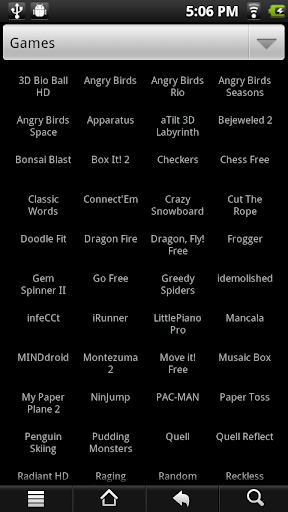
To conserve memory, there are no instructions in the app. To create a new category, press MENU (or "...") and choose New Category. To move an app to a category, just long tap on the app. An app can be in more than one category. Three categories are special. UNCLASSIFIED lists apps that haven't been specifically put into a category. HIDDEN is for apps you want to exclude from the ALL category. And ALL lists all apps, except those that are HIDDEN. Finally, you can create a category named "Home" (capital-H, rest lowercase) and when you press the HOME button while in TinyLaunch, it will go to that category.
The toddler lock feature makes the hidden category completely invisible and disables editing. Turn this on with MENU (or three dots), Settings, Toddler mode. Once you've activated Toddler mode, you'll need to type in "not toddler" to a query screen in order to get back to the settings. I recommend using Toddler mode together with a restricted profile on Android versions that support restricted profiles, hiding the system settings and anything a toddler can spend money with. You should also make sure that the default launcher isn't accessible to the toddler with the multitasking key or long-tap on home (you may be able to swipe it out of the list).
In updates, the APK for this is guaranteed to stay under 40K and I will maintain compatibility back to Android 1.6. Full source code is available at code.google.com/p/tinylaunch
What's New
0.12: HOME button goes to ALL category (or Home category if one exists)
0.11: Fix light theme bug
0.10: Add light theme (especially for eInk devices)
0.08: Initial Google Play release
Version Information
- Version
- 0.14
- Downloads
- 1K+
- Updated on
- Nov 11, 2014
- Released
- Nov 20, 2013
- Requires
- Android 1.5
Statistics
Google Play Rating History
Rating Distribution
Downloads Over Time
TinyLaunch with toddler lock has been downloaded times. Over the past 30 days, it averaged downloads per day.
Shaded area shows 30-day prediction based on historical trends
Historical data collection started recently. More data points will be available over time.
TinyLaunch with toddler lock users say on Google Play
 A Google user
But i would like you to look at aviate launchers application drawer you might see inspiration from the way apps are sorted and divided by letters. It would make it nicer to look at. And could there be a possibility in the future to include at least one homescreen to be able to include important widgets such as calendar or alarm?
 tuomas tuominen
Would use this, but it doesnt show the app icons correctly. Searchbox would also be nice
A Google user
Not working for samsung galaxy y
ApkTrusted Ratings & Reviews
More from Omega Centauri Software
See more apps
FastLaunch
Free
P1 Keyboard
Free

ScreenDim Full
Paid
Send Reduced Lite
Free
LunarMap HD
Paid
![Color Changer Pro [root] icon](https://play-lh.googleusercontent.com/3VXjjoqLwHWB0o4wFRfQlFjxwdje5iTnsbeCaWF7fVWLU5DsxxYUuCn-qM4q4atwIw)
Color Changer Pro [root]
Paid
![Color Changer Lite [root] icon](https://play-lh.googleusercontent.com/UuHPEjeGBDG1jxX6-rm7doIl1Xm67wDvb8BgfGaG1qUsAixqXq_n2XX_8QaM4VoNNPg)
Color Changer Lite [root]
Free
LunarMap Lite
Free
Raspberry Jam Mod
Free
Send Reduced Pro
Paid

LibriVox Downloader
Free

ScreenDim Trial
Free
Two Point Height
Free
Brainlink Firmware Uploader
Free

Giant Heart Rate
Free
Shogi with Bonanza
Free
Similar Apps

Progressive Pomo: Focus Timer
Paid

Nothing Pomodoro Timer
Paid
Pomotimer - ADHD & Study Timer
Free
Time Timer Visual Productivity
Free

Breathing Exerise Guide
Paid
AI Vocabulary Builder - Vokab
Paid

Focusmeter: Pomodoro Timer
Free

GoalQuest: daily goal coaching
Free
Tally Counter & Score Clicker
Free

Sleep Tracker basic
Paid

Socratic AI: Math Help, Solver
Paid

MultiTimer: Multiple timers
Free

Healthy Habbits Checklist
Paid
Scan this QR code to download

Forwarding you to the page at Google Play market in seconds...
Open Google Play market now