
Google Calendar vVARY
Google LLC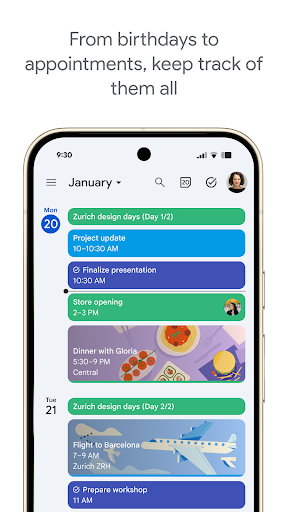


About this app
Developer Description
Make the most of your day with Google Calendar, part of Google Workspace
With Google Calendar, you can:
• Get events automatically added to your Calendar from Gmail, including flight, hotel, concert, and restaurant reservations.
• Go from using Calendar on your Android phone, tablet, or Wear OS device to your computer without missing a beat when you’re logged into the same Google account.
• Consolidate and view Google Calendar events side-by-side with other calendars on your device, including Exchange.
• Keep family, friends, and colleagues in the loop with shared calendars, so they can view, add, or modify events.
• Quickly switch between month, week, and day views.
• Stay on top of to-dos by creating and managing tasks alongside your events in Calendar.
• Personalize your Google Calendar with light or dark mode or by color-coding your events.
• Access and organize your task lists in a full-screen view right from the Google Calendar app.
• Keep track of events or tasks while on the go with Google Calendar on Wear OS devices, which supports tiles and complications.
Google Calendar is part of Google Workspace, allowing you and your team to easily connect, create, and collaborate across all your favorite Google tools. You can:
• Collaborate in a hybrid work environment by adding a Google Meet video call to an Calendar event
• Get access to professional booking pages to easily book clients and customers*.
• Schedule meetings with teammates by checking their availability or layering their calendars in a single view
• Add your working location to your calendar to make it easier for your teammates to schedule meetings with you*.
• Keep everyone on track for a meeting by attaching meeting notes, pre-read materials, and other documents directly to a calendar event.
• Use Google Calendar with confidence knowing it’s supported by Google’s enterprise-level privacy, user safety and data security.
Learn more about Google Workspace: https://workspace.google.com/products/calendar/
Follow us for more:
X: https://x.com/googleworkspace
LinkedIn: https://www.linkedin.com/showcase/googleworkspace
Facebook: https://www.facebook.com/googleworkspace/
Version Information
- Version
- -
- Downloads
- 5.0B+
- Updated on
- Dec 18, 2025
- Released
- Oct 17, 2012
- Requires
- Android Varies with device
Statistics
Google Play Rating History
Rating Distribution
Downloads Over Time
Google Calendar has been downloaded times. Over the past 30 days, it averaged downloads per day.
Shaded area shows 30-day prediction based on historical trends
Historical data collection started recently. More data points will be available over time.
Google Calendar - Google Play Rankings
Top Rankings
| Rank | Country | Category | List | Change |
|---|---|---|---|---|
| — |
Ranking History in
No ranking data available yet. Rankings are updated daily.
#43 in Top Free Productivity in United States


#33 in Top Free Productivity in United Kingdom

#34 in Top Free Productivity in Canada

Google Calendar users say on Google Play
 Julie Greenstone
I love the calendar app and use it daily to keep track of our family activities. Being able to share events with other users is a valuable option and the addition of video meetings came in very handy during the pandemic. Being a Gmail user, the fact that all apps intertwine is very useful and makes it easier to get everyone on a schedule. **It has been several years and I still love using the calendar. Our children are iPhone users and we are Android users, we get to our appointments.
 Neil G (Tank)
A great little app that seems to work well without getting in the way or being over intrusive.
 Rhea Kelly
I love this Google Calendar and I have never found anything that anywhere nearly compares to this app but it is getting frustrated because I haven't been able to search at all for about 6 months. Do you have any suggestions please? Thank you.
 Anna Martino
Invite by Link vanished for some reason today. OLD BUGS: 1) SEARCH DOESN'T WORK (Samsung S21 & Apple iPad Pro) for Past Apts INVISIBLE from 2010 on Sa& LG G4 since 12-11-18. It is only finds from 2021. 2) MAJOR Bug: Editing All Events in old Series Functionally Vanished on App and Web in 2018 when editing random event in series, but if I try to Delete All Events in a Series this Function still works as opt. 3, but doesn't exist when just trying to Edit Series. PLEASE FIX SEARCH TO FIND ALL APT
 nico rib
not as reliable as it should be and the latest updates are slowing everything down (eg events show for a several seconds when starting app and then tasks from previous days will appear then tasks from today onward--- other problem: modifying time/date start of an event automatically pushes fwd/back time/date end of event (quite ridiculous...) google asks me for more info... see above...
ApkTrusted Ratings & Reviews
More from Google LLC
See more apps
Chrome Beta
Free

Chrome Dev
Free

Chrome Canary (Unstable)
Free

Magnifier
Free

Fitbit
Free

Lookout - Assisted vision
Free

Test DPC
Free

Google Chrome
Free

Accessibility Scanner
Free

Compose Material Catalog
Free

Action Blocks
Free

Sound Amplifier
Free

Switch Access
Free

Reading mode
Free

Pixel Camera
Free

Android AICore
Free
Similar Apps

Calendar Planner - Agenda App
Free
Calendar 2026: Simple Calendar
Free

Samsung Calendar
Free

Microsoft Outlook
Free
Simple Calendar
Free

Samsung Internet Browser
Free

Zoom Workplace
Free

Samsung Notes
Free

Microsoft Teams
Free

Business Calendar 2 Planner
Free

Messenger
Free
Samsung Calculator
Free

Microsoft OneDrive
Free
Notepad, Notes, Easy Notebook
Free

Microsoft Excel: Spreadsheets
Free

Clock
Free
Scan this QR code to download

Forwarding you to the page at Google Play market in seconds...
Open Google Play market now