
DS get v1.12.5
Synology Inc.


About this app
Developer Description
Download anything easily to your Synology NAS Server
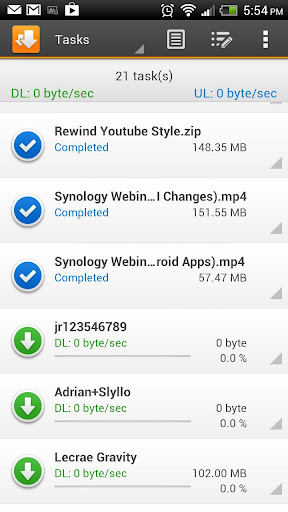
With DS get, manage your downloads anywhere you are with your Android Device, directly to you DiskStation. In addition to viewing your Download Station status, individual task information, controlling key settings such as download schedules, DS get also has an inbuilt browser to conveniently start downloads, and integrates with Chrome. You can even use keywords to search for content, just like in Download Station.
Find all detailed features about the app on our website:
www.synology.com > DSM 6.0 > Mobile Apps > Software Specs
https://www.synology.com/dsm/software_spec/mobile#DSdownload
What's New
1. Added support for 64-bit architectures.
Bug Fixed
1. Fixed the issue where users might not be able to sign in with 2-factor authentication enabled.
2. Fixed the issue where the scrollbar might cover the More button.
3. Fixed the issue where using magnet links containing "https" to create a download task might not work properly.
4. Minor bug fixes.
Version Information
- Version
- 1.12.5
- Downloads
- 10M+
- Updated on
- Oct 19, 2020
- Released
- Jan 8, 2013
- Requires
- Android 5.0
Statistics
Google Play Rating History
Rating Distribution
Downloads Over Time
DS get has been downloaded times. Over the past 30 days, it averaged downloads per day.
Shaded area shows 30-day prediction based on historical trends
Historical data collection started recently. More data points will be available over time.
DS get users say on Google Play
 Adam Dawood
Absolutely stellar app. I can control downloads to my server anywhere in the world with this application. My phone becomes a portable server control center with the utilisation of all the Synology applications. Cannot recommend enough.
 Budana P
Very raw in development. I cant even connect to BT. Browser does not allow me to type URL, always overwrites with visited URL. Dont see any use, yet, with this app. Edited 7 March 2021: Getting better with Bt connectivity. Keep it up!
 David Kennedy
It doesn't remember the last folder used so when adding episodes to a folder you have to go find the folder each time to download the episode to. With a lot of nested folders is really annoying. Please fix this and not always put us back to the root folder each time.
 TheBencher
Cant change download/upload speeds. When i click to change them app crashes.
 Eli Linares
It appears to be useless and abandoned. I'm pretty surprised by this as I just got my expensive Synology NAS and I was sold on all the new and shiny supporting apps that go along with it. The app complains that i must update to DSM 6 ( The actual latest version which I have already installed is DSM 7, go figure) It also tells me that I need to update Diskstation server, but it's already on the latest version as well. What's going on here Synology? Are you losing grip on the basics?
ApkTrusted Ratings & Reviews
More from Synology Inc.
See more apps









Similar Apps





Scan this QR code to download

Forwarding you to the page at Google Play market in seconds...
Open Google Play market now