
Synology Photos vVARY
Synology Inc.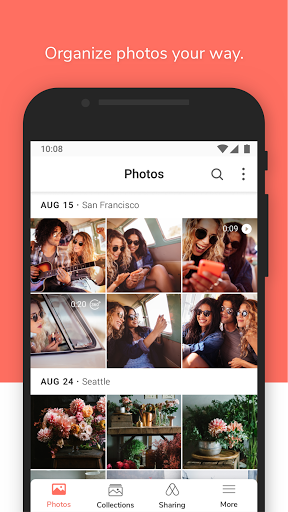


About this app
Synology Photos aims to solve the problem of managing and organizing personal photos efficiently, benefiting individuals with large photo collections, particularly those already invested in the Synology ecosystem. Compared to other personalization apps, Synology Photos stands out with its focus on photo management, but its mixed user rating of 3.0/5 suggests some users may find it lacking in certain features or usability. The app's strength lies in its ability to integrate with Synology devices, making it a solid choice for those with such hardware. However, its overall value proposition may fall short for users without a Synology setup or seeking more comprehensive photo editing capabilities.
Pros
- With over 1,000,000 downloads, Synology Photos has demonstrated a level of social proof, indicating a significant user base that finds the app useful for their photo management needs.
- The app's free model, devoid of ads and in-app purchases, provides a clean and uninterrupted user experience, aligning with the expectations of users seeking a straightforward photo management solution.
- Synology Inc.'s reputation as a developer of network-attached storage (NAS) devices and related software lends credibility to the app, suggesting a deep understanding of data management and security.
- The absence of any permissions requests is a significant advantage, as it alleviates concerns about data privacy and security, making it an attractive option for users cautious about their personal data.
- For users with Synology devices, the app's integration capabilities can significantly enhance their photo management experience, offering a centralized and organized approach to viewing and sharing photos.
Cons
- The mixed user rating of 3.0/5 suggests that some users may encounter issues with the app's functionality, usability, or compatibility, which could deter potential users seeking a more universally praised solution.
- The lack of detailed information about the app's version and size, along with the variable Android requirement, might cause confusion or compatibility issues for some users, particularly those with older devices or specific hardware configurations.
- Users seeking advanced photo editing features may find Synology Photos to be limited in its capabilities, as its primary focus is on management and organization rather than editing or enhancement.
- The app's dependence on Synology hardware for full functionality might limit its appeal to a broader audience, making it less versatile compared to standalone photo management apps.
Best for: The ideal user for Synology Photos is likely a tech-savvy individual or family with a Synology NAS device, a large collection of digital photos, and a need for a centralized, user-friendly photo management solution that integrates well with their existing hardware, allowing for easy access, sharing, and organization of their cherished memories.
Developer Description
Smart and flexible management of all your cherished shots.
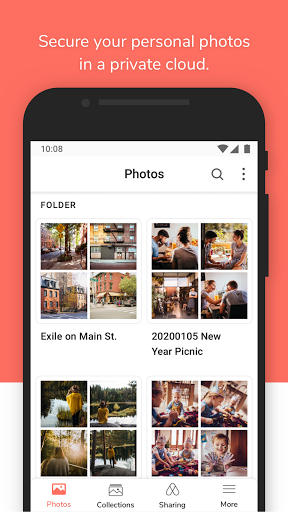
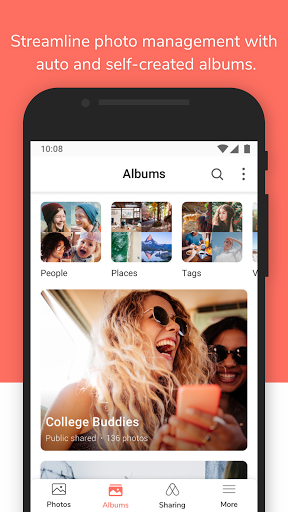
A flexible and comprehensive management tool that allows photo backup and browsing by chronological order or folder structure. Explore photos of loved ones or favorite vacation spots through automatically created albums. Group photos by themes or topics of your choice. Enjoy cherished memories in the palm of your hand.
Privacy
Given that Synology Photos requests no permissions, it presents a low risk in terms of data privacy and security, making it a safe choice for users concerned about their personal data. However, users should still be cautious when sharing photos through the app, ensuring they are aware of the recipients and the privacy settings of their Synology devices. Regularly reviewing and updating the app, as well as ensuring the security of the associated Synology account, is advisable to protect against any potential vulnerabilities.
Tips
To get the most out of Synology Photos, users should first ensure their Synology device is properly set up and connected to their network, then configure the app to sync their desired photo collections. Utilizing the app's organizational features, such as albums and tags, can significantly enhance the photo browsing experience. Additionally, exploring the app's settings to customize the sync and storage options can help optimize performance and data usage.
What's New
1. Fixed an issue where folder covers might not display correctly.
Version Information
- Version
- -
- Downloads
- 1M+
- Updated on
- Dec 8, 2025
- Released
- Dec 2, 2020
- Requires
- Android Varies with device
Statistics
Google Play Rating History
Rating Distribution
Downloads Over Time
Synology Photos has been downloaded times. Over the past 30 days, it averaged downloads per day.
Shaded area shows 30-day prediction based on historical trends
Historical data collection started recently. More data points will be available over time.
Synology Photos users say on Google Play
 Gautam Eswaran
Simple and excellent photo app. Able to create Album and focused backup option is great idea. Works comfortable with my DS223.
 Andy Grace
Update ----- 12-2-25 removed a star, issue with the backup task not starting automatically on my Samsung S25 Ultra. I have battery optimization turned off and allow background data turned on. I have to force stop the app and open it again to get it to start a backup.
 David Ferreira
Still some way to go to become on par with google photos in terms of ease of use (eg. choosing best photo from burst), but getting there.. Downgrading another star as HDR support for photos (Pixel/iPhone) and videos still not present...
 Matthew Gill
Asks for verification code all the time even though I select trust device. I have to keep checking to make sure it is working and actually backing up my photos and most of the time now it isn't because I can to re-enter another verification code. it's gets almost unusable.
 D
D
Annoying! Half of your life is spent inserting verification code for this app. It needs the code multiple times in one try and multiple times a day. Why?? It's supposed to be a seamless experience and should run without problems in the background, instead this is turning out be a pain now. Every day, you need to open this app and insert the code to trust the device. Just fix it. It was supposed to be a google drive replacement, instead it's just a buggy app now.
ApkTrusted Ratings & Reviews
More from Synology Inc.
See more apps













Similar Apps

Fotoo - Photo Frame Slideshow
Free

Smart Gallery - Photo Manager
Free

Frameo: Share to photo frames
Free

Gallery - photo gallery, album
Free

Gallery- Photo Gallery & Album
Free
Right Gallery
Free

Twilight: Blue light filter
Free

Gallery - Album, Photo Vault
Free

GuruShots: Photo Game
Free

Glamora - Photo Video Editor
Free

Simple Gallery Pro
Paid

Gallery
Free

PhotoPad Photo Editor
Free

Image Toolbox - Edit & Convert
Free

File Manager
Free

celebrate: share photo & video
Free
Scan this QR code to download

Forwarding you to the page at Google Play market in seconds...
Open Google Play market now