File Manager v2.6.0.1041
Transsion Holdings


About this app
The File Manager app by Transsion Holdings solves the problem of efficiently managing files on Android devices, benefiting users who need to organize and access their files on-the-go. With over 1 billion downloads and a 4.4-star rating, it stands out in the Tools category for its popularity and user satisfaction. However, its lack of unique features compared to other file managers and the presence of ads may deter some users. Overall, it's a solid choice for basic file management needs, but power users may find it lacking in advanced features.
Pros
- The app's massive download numbers and high user rating are a testament to its reliability and effectiveness in managing files, making it a trustworthy choice for users.
- The developer, Transsion Holdings, has a reputation for producing user-friendly apps, which is reflected in the app's intuitive interface and ease of use.
- The app's small size and minimal permissions make it a great option for devices with limited storage and those concerned about privacy.
- Regular updates ensure that the app stays compatible with the latest Android versions and security patches, providing users with a secure file management experience.
- The app's offline capability allows users to manage their files without an internet connection, making it useful in areas with poor network coverage.
Cons
- The presence of ads may be intrusive for some users, potentially disrupting their file management experience and slowing down the app's performance.
- The app's lack of advanced features, such as cloud storage integration or file encryption, may not meet the needs of power users who require more robust file management capabilities.
- Some users may find the app's interface to be basic and lacking in customization options, which could make it less appealing to those who value a personalized experience.
- The developer's email support may not be responsive to user queries and concerns, which could lead to frustration if issues arise.
Best for: The ideal user for the File Manager app is a casual Android user who needs a simple and reliable file management solution, likely someone who uses their device for basic tasks such as browsing, social media, and storing personal files, and values ease of use and minimalism over advanced features and customization options.
Developer Description
Professional WhatsApp status saver
The main function:
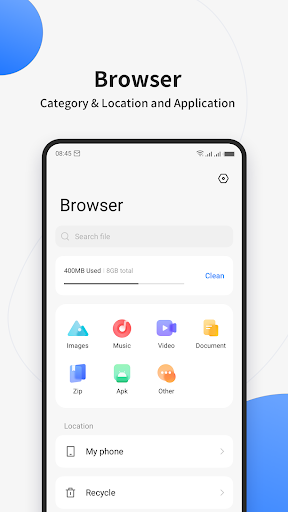
Category: Sort by music, video, image, document, zip, apk, others
Clean up: Clean your phone with one click and free up your phone space
Global search: Quickly find files with keywords
Multiple selection: support multiple selection operations and batch processing of files
Privacy
Since the app requires no permissions, the risk of data collection and privacy breaches is minimal. However, users should still be cautious when downloading and installing apps from unknown sources, and ensure they only download from trusted stores like the Play Store. To further protect their data, users should regularly review the app's terms and conditions and privacy policy.
Tips
To get the most out of the File Manager app, users should first familiarize themselves with the app's interface and features, such as the file sorting and searching functions. They can also optimize the app's performance by regularly cleaning up temporary files and clearing the cache. Additionally, users can use the app's built-in file sharing feature to easily transfer files between devices.
What's New
Version Information
- Version
- 2.6.0.1041
- Downloads
- 1.0B+
- Updated on
- Jun 26, 2023
- Released
- Jul 25, 2018
- Requires
- Android 7.0
Statistics
Google Play Rating History
Rating Distribution
Downloads Over Time
File Manager has been downloaded times. Over the past 30 days, it averaged downloads per day.
Shaded area shows 30-day prediction based on historical trends
Historical data collection started recently. More data points will be available over time.
File Manager users say on Google Play
 Ramdevi ahirwar
very very nice and useful 😄☺️☺️☺️☺️
 Umar raza Butt
nice app
 Aye Thet Lin
good
 Faisal Hayat
there should be an option show "Browse" section instead of "Recents" when starting this app.
 Kashif Khan
there's no file that is in downloading process. i mean i used to watch the downloaded part of a 2 Gb movie when it was about 60% downloaded . but there's nothing shown even it's 70%
ApkTrusted Ratings & Reviews
More from Transsion Holdings
See more apps













Similar Apps

File Manager
Free
Material Files
Free

File Manager
Free

Samsung My Files
Free

Explorer
Free

ASTRO File Manager & Cleaner
Free

Swift Backup
Free
ZX File Manager
Free

Super File Manager Explorer
Free

Total Commander - file manager
Free
File Manager
Free
My Folder : Safe Secure Hidden
Free

POCO Launcher 2.0 - Customize,
Free

Storage Analyzer & Disk Usage
Free

EX File Manager
Free

fooView - FV Float Viewer
Free
Scan this QR code to download

Forwarding you to the page at Google Play market in seconds...
Open Google Play market now