
Autosync for Google Drive vVARY
MetaCtrl



About this app
Developer Description
Automatic file sync and backup tool for Google Drive cloud storage
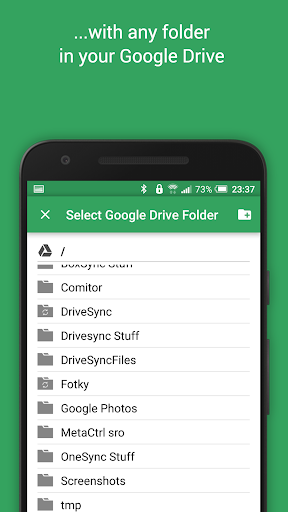
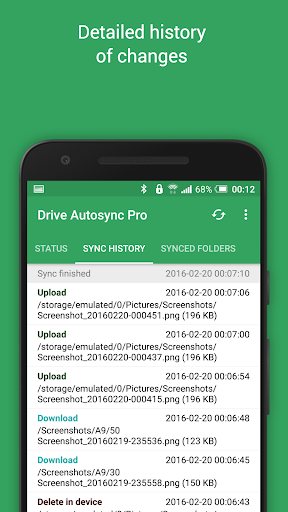
New files in your cloud account are automatically downloaded onto your device. New files in your device are uploaded. If you delete a file on one side, it will be deleted on the other side. It works across multiple devices (your phone and your tablet). If their folders are synced with the same cloud account, they will be kept in sync with each other.
This is how Google Drive works on computers but not on Android. Two-way automatic synchronization should be an essential function of the official app. For whatever reason, it is not the case. Autosync for Google Drive is here to fill the gap.
All file transfers and communications between user devices and cloud storage servers are securely encrypted and do not go through our servers. No outsiders will be able to decrypt, see or modify any file contents.
MAIN FEATURES
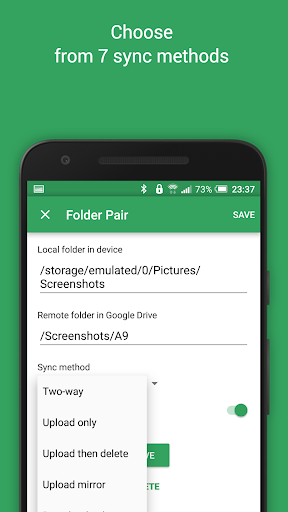
• Full two-way automatic synchronization of files and folders
• Very efficient, consumes almost no battery
• Easy to set up. Once set up files will be kept in sync without any effort from users
• Works reliably under ever changing network conditions on your phone
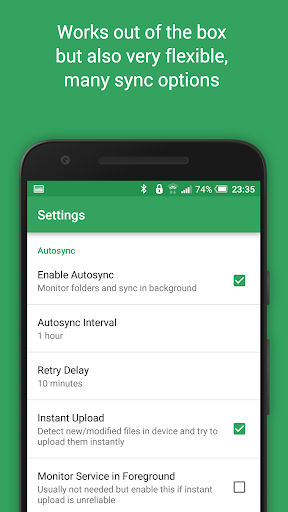
• Monitors battery level, WiFi/3G/4G/LTE connectivity and adapts its behavior according to user preferences
• Configurable autosync interval: 15 minutes, 30 minutes, every hour,...
If you like this app, please consider upgrading to premium version. By doing so you support the development efforts and get access to premium features. You can upgrade via in-app purchase.
PREMIUM FEATURES
• Sync multiple pairs of folders
• Upload files larger than 10 MB
• Sync your entire cloud account with a folder in your device
• Sync with multiple accounts
• Sync with shared drives
• Protect app settings with passcode
• No ads displayed in the app
• Email support by developer
SUPPORT
Please check out our website (http://metactrl.com/) for more information about the app, including User's Guide (http://metactrl.com/userguide/) and FAQ (http://metactrl.com/faq/). If you run into any issues or have suggestions for improvements, don't hesitate to email us at drivesync@metactrl.com. We will do our best to assist you.
What's New
If you like our app, please give it a nice 5-star rating. If you run into issues or have questions, don't hesitate to email us at drivesync@metactrl.com. We'll follow up.
In-app purchases
$1.99 - $9.99 per item
Version Information
- Version
- -
- Downloads
- 1M+
- Updated on
- Nov 29, 2025
- Released
- Dec 30, 2013
- Requires
- Android Varies with device
Statistics
Google Play Rating History
Rating Distribution
Downloads Over Time
Autosync for Google Drive has been downloaded times. Over the past 30 days, it averaged downloads per day.
Shaded area shows 30-day prediction based on historical trends
Historical data collection started recently. More data points will be available over time.
Autosync for Google Drive users say on Google Play
 Matt Jackson (Mutoi)
I have had this app for 5 years. It has flawlessly allowed my Google drive files to sync to my phone, work on those files from the phone, then update the drive files with my updated work. I can work out of the drive off my phone, pc, pi, or laptop and everything syncs with Google and then I hit the drive sync pro button and voila! My phone downloads everything allowed. I have had zero loss of data since using this app and it will save even the .trash/hidden files if u have such options on. 5/5*!
 Joseph Brach
Love your app. But can you add smb3 local access. I'm moving all files off drive would be nice to move directly to my network drive
 deb patterson
not sure if I like it yet?
 abhinav garg
The files aren't syncing regularly-sometimes it takes days for data to update. For example, if files sync at 7:00 a.m., everything added before that syncs fine, but files added later (like at 7:30 a.m. or 8:00 a.m.) don't sync at all. I've already granted all permissions and disabled battery optimization to allow real-time syncing, yet the issue persists. Sometimes the sync resumes after days, and other times it never restarts.
 Nevada ZG
This app is useless. can't even use it for one folder because it forces you to waste your one folder on a "test" folder to ensure it works. if I could give negative stars, I would. they should be paying the populace to use their product, not asking the populace to pay them to use their product.
ApkTrusted Ratings & Reviews
More from MetaCtrl
See more apps

Similar Apps
DAVx⁵ – CalDAV CardDAV WebDAV
Paid

AppDash: App Manager & Backup
Free

WeTransfer : File Transfer
Free

pCloud: Cloud Storage
Free

Box
Free

CSV File Viewer - Smart CSV
Free

MobiDrive Cloud Storage & Sync
Free

Yandex Disk – Cloud Storage
Free
Cloud: Video, photo storage
Free

Samsung Members
Free

OfficeSuite Pro + PDF
Paid

Samsung My Files
Free

Swift Backup
Free

myPhonak
Free

Send Anywhere (File Transfer)
Free

Ava: Transcribe Voice to Text
Free
Scan this QR code to download

Forwarding you to the page at Google Play market in seconds...
Open Google Play market now