
Max Screen Splitter v1.0.5.AF
MAXCOM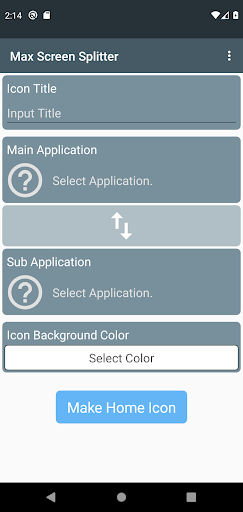
About this app
Developer Description
Open two apps with just one click!!!
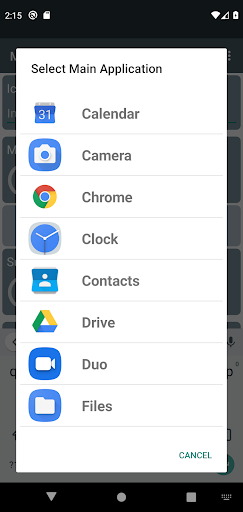
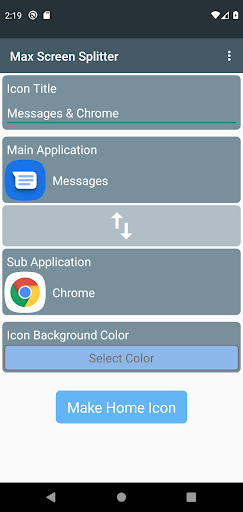
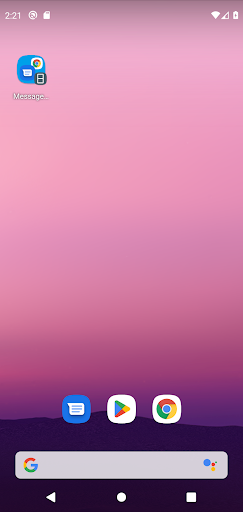
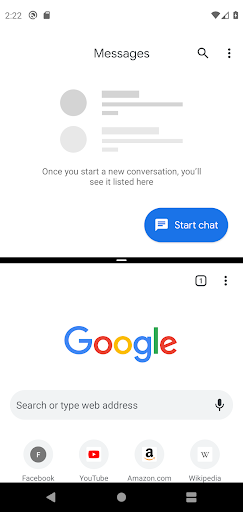
Select two apps from the currently installed apps on your device, create desktop shortcut icons, and when you press the shortcut icon installed on the desktop, it launches each app on split screens.
Since the shortcut icons are created using the icon images of the selected apps, it is easy to see which app will open when clicked.
Try using the screen splitting feature conveniently with Max Screen Splitter!!!
What's New
- Support foldable phone screen sizes.
Version Information
- Version
- 1.0.5.AF
- Downloads
- 500K+
- Updated on
- Dec 19, 2024
- Released
- Apr 10, 2023
- Requires
- Android 8.0
Statistics
Google Play Rating History
Rating Distribution
Downloads Over Time
Max Screen Splitter has been downloaded times. Over the past 30 days, it averaged downloads per day.
Shaded area shows 30-day prediction based on historical trends
Historical data collection started recently. More data points will be available over time.
Max Screen Splitter - Google Play Rankings
Top Rankings
| Rank | Country | Category | List | Change |
|---|---|---|---|---|
| — |
Ranking History in
No ranking data available yet. Rankings are updated daily.
#118 in Top Free Personalization in Turkey


Max Screen Splitter users say on Google Play
 Don Joacquin Reg
Idk why this split screen shortcut app has a low rating but it perfectly works fine now 2024 like its prolly the best split screen shortcut up cuz the others don't even split screen when I open it so why does this app such a low rating it works perfectly fine now 2024.
 roy alx
Exactly what I was looking for... perfect..redmi13 do not have split function :))
 Mahir Aman oro
This app is very good. It split screen easily.
 Ryan Tillett
It does not say how to split screen
 Yvette Gonzalez
extremely suspicious right now, installed app, opened it and after selecting 2 apps, added shortcut. Clicked on it and it just re opened up your app and then I put a secondary home screen short cut because the first one just had your app icon displayed. The second one actually had a previews of the 2 apps. I deleted the first one then I hit the second shortcut to test it and it said that the application wasnt installed, and Play Store says it's not installed. I didn't delete the app
ApkTrusted Ratings & Reviews
More from MAXCOM
See more apps
Biorhythm
Paid

Max Unit Converter
Free

ToolBox
Paid

Max Stopwatch
Free

Max Ruler
Free

Max Mag Detector
Free

Max Protractor
Free

Max Compass
Free
Max Timer
Free

D-Day Counter & Memo Widget
Free

D-Day Counter & Memo Widget
Free

Biorhythm
Free
Max Altimeter
Free

Max Color Picker
Free

Max Counter
Free

Max Decibel Meter
Free
Similar Apps

Taskbar
Free
Floating Apps (multitasking)
Free
Macrorify - Image Auto Clicker
Free

Spatial Touch™
Free

WireGuard
Free

Explorer
Free
Tally Counter & Score Clicker
Free

MacroDroid - Device Automation
Free
CPU Monitor - temperature
Free

Video Recorder
Paid

G-CPU:Monitor CPU, RAM, Widget
Free

RealVNC Viewer: Remote Desktop
Free

Quikshort: Shortcut Creator
Free
Glip Screen Recorder
Free

Multi App-Space
Free

Mantis Laser Academy
Free
Scan this QR code to download

Forwarding you to the page at Google Play market in seconds...
Open Google Play market now